Redirect chains happen when one URL redirects to another URL that redirects again before the browser reaches the final page. They often appear after migrations, HTTPS changes, hostname changes, URL cleanup, or several redirect rules being added over time.
How do you check a redirect chain for SEO? Start with the exact source URL, trace every HTTP 3xx hop until the final response, record the status code and destination at each step, and then compare the route with the destination you actually want. Google recommends avoiding redirect chains and says the final destination should be reached as directly as possible.
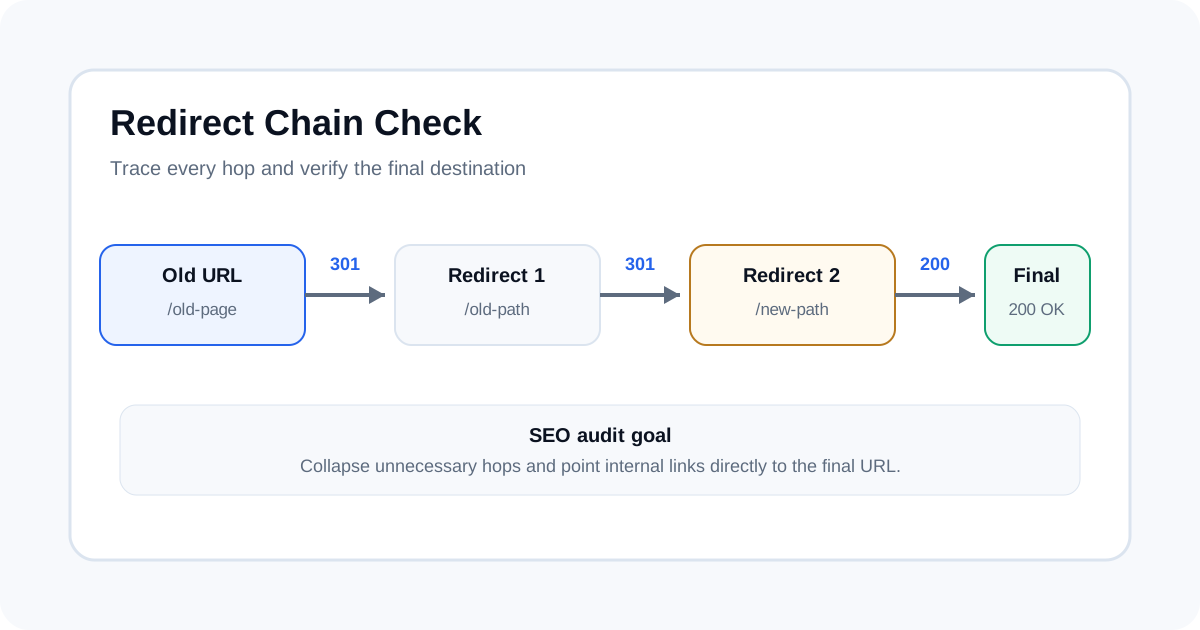
What a redirect chain is and why it happens
A redirect chain has more than one redirect between the URL a user or crawler requests and the final destination. A simple migration may look like this:
http://example.com/old-page → 301 → https://example.com/old-page → 301 → https://www.example.com/new-page → 200
The browser may hide most of this from the user, but each extra hop still has to be processed. Chains commonly appear when several independent rules are layered together. For example, an old CMS redirect can point to an HTTPS URL while a later site migration rule sends that URL to a new slug.
A redirect chain is different from a single clean redirect. A single 301 from an old URL directly to the final URL is usually much easier to maintain and audit.
Why redirect chains matter for technical SEO
Google's site-move guidance recommends server-side permanent redirects and says to avoid chaining redirects. The reason is practical: every extra hop adds work and can add latency, and long chains are harder to debug when one rule changes.
Google says Googlebot can follow up to 10 hops in a chain, but it advises keeping chains low, ideally no more than three and fewer than five. That is a diagnostic limit, not a target. For an internal link or migration mapping, the better end state is normally a direct request to the final canonical URL.
Redirect chain vs redirect loop vs direct redirect
| Pattern | Example | What to do |
|---|---|---|
| Direct redirect | Old → 301 → Final → 200 | Usually the cleanest migration path. |
| Redirect chain | Old → 301 → Mid → 301 → Final → 200 | Collapse unnecessary hops where possible. |
| Redirect loop | A → 301 → B → 301 → A | Fix the conflicting rules so one final destination exists. |
| Redirect to error | Old → 301 → Final → 404 | Point the redirect to a valid, relevant destination. |
How to check a redirect chain manually
- Copy the exact starting URL. Include the protocol, hostname, path, and important query parameters.
- Request the URL without hiding redirects. Record the first response status and Location header.
- Record every hop. Write down each requested URL, status code and destination.
- Continue until the response is not a redirect. The final response may be 200, 404, 410, 5xx or another status.
- Compare the route with the intended canonical destination. Where practical, internal links should point directly to the final URL.
How to find redirect chains across a whole site
Manual checks are useful for a small sample, but a migration or technical SEO audit can involve thousands of URLs. Use a crawler that records redirect hops and export the full chain. Screaming Frog has a Redirect Chains report for this purpose.
What to record in a redirect audit
| Field | Why it matters |
|---|---|
| Source URL | The URL users, backlinks, or internal links may request. |
| Status for each hop | Shows whether the route uses 301, 302, 307, 308, or another response. |
| Destination URL | Shows exactly where each rule sends the request. |
| Hop count | Makes long chains easy to sort and prioritize. |
| Final status | Confirms whether the chain ends at a valid page or an error. |
| Final URL | Lets you compare the result with the preferred canonical destination. |
How to fix a redirect chain
The usual fix is to make the source URL point directly to the final destination. Also update internal links so your own pages reference the final resolving URL rather than a URL that redirects.
When changing redirect rules, check the reason each rule exists. Removing one rule without checking its other URLs can create broken redirects or loops.
301, 302, 307 and 308
Choose the status code based on the real business and application intent. A 301 normally indicates a permanent move, while a 302 normally indicates a temporary move. 307 and 308 preserve the request method.
Redirect chains after a site migration
Migrations are one of the most common times to discover long chains. Domains, protocols, folder paths, CMS rules, and page slugs can all change at once. Build a source-to-destination map, then crawl that map and inspect the full route after launch.
For crawl and URL discovery checks around a migration, read how to find orphan pages with a crawl and sitemap.
Redirect chains and robots.txt
Redirect behavior and crawl controls are separate. A robots.txt rule can prevent a crawler from requesting a URL, while a redirect determines what happens after a request reaches the server. Review both when a migration has unexpected discovery or crawl behavior.
ToolBoxKart's robots.txt SEO testing guide covers the crawl-control side.
Redirect chains and XML sitemaps
Your XML sitemap should normally contain the canonical URLs you want search engines to discover, not URLs that first redirect somewhere else. After fixing a redirect chain, check that the sitemap points to the final URL.
See how to validate an XML sitemap before publishing for the sitemap QA workflow.
Redirect chains and canonical tags
A redirect changes the requested URL's destination. A canonical tag identifies a preferred URL among duplicate or near-duplicate pages. They solve different problems, so check the redirect route and the final page's canonical separately.
Practical redirect-chain audit checklist
- Trace every hop for important source URLs.
- Flag loops, error endings and unnecessary chains.
- Update internal links to final URLs.
- Check redirect status codes against the intended move.
- Verify final canonicals and indexability.
- Re-crawl after making changes.
How ToolBoxKart fits into the audit
Use the SEO Meta Extractor for page metadata checks and the Robots.txt Generator for crawl-control changes. Trace the HTTP redirect path separately so each tool is used for the signal it actually measures.
Related ToolBoxKart guides
For canonical strategy, read Canonical Tags for Faceted Navigation SEO. For robots checks, use How to Test Robots.txt for SEO. For sitemap QA, read How to Validate an XML Sitemap Before Publishing. For URL discovery, use How to Find Orphan Pages with Crawls and Sitemaps.
Frequently asked questions
How many redirects are too many?
Google advises keeping redirect chains low, ideally no more than three and fewer than five, even though Googlebot can follow up to 10 hops.
Should internal links point to redirected URLs?
Where practical, internal links should point directly to the final URL.
Can a redirect chain end at a 404?
Yes. Always inspect the final response instead of counting only the 3xx hops.
Sources
- Google Search Central — Site Moves and Migrations
- Screaming Frog — Internal Redirect Chains
- RFC 9110 — HTTP Semantics