A client can have stable organic rankings while its visibility inside AI search changes significantly. That creates a reporting gap: traditional Search Console data can show what happens in Google’s standard search results, but agencies also need to understand whether client pages are appearing inside Google’s AI experiences and other AI platforms.
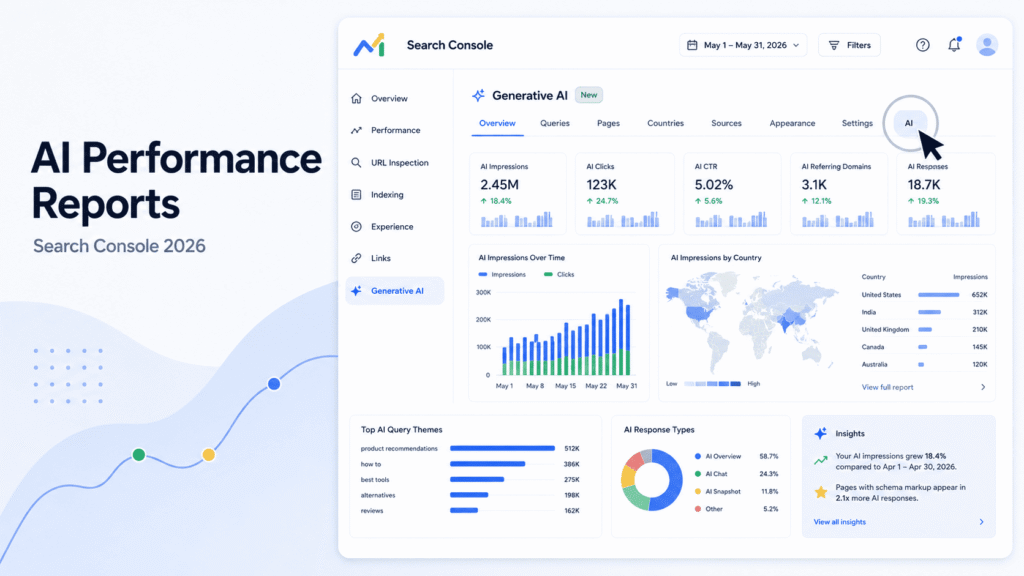
Google announced its Search Generative AI performance reports on June 3, 2026. The dedicated reports show visibility data for generative AI features in Google Search and Discover, including AI Overviews and AI Mode. Google initially released the reports to a subset of websites. By August 11, independent industry reporting indicated that the report had become broadly available across Search Console properties. Google’s official explanation of the Generative AI performance report
The important point for agencies is that this is a new measurement layer, not a replacement for traditional SEO reporting.
The Google report gives agencies useful visibility data, but it does not show the full path from AI appearance to click, lead, or revenue. A practical reporting system therefore needs several layers:
Google Search Console AI data → broader AI visibility tracking → traffic and business data → client reporting → optimization actions
The rest of this guide shows how to build that system, work around the current API limitation, preserve historical data, and turn AI visibility reporting into a practical agency service.
What Google’s Generative AI Performance Report Actually Measures
Google’s dedicated report provides a separate view of how URLs from a website appear in generative AI features.
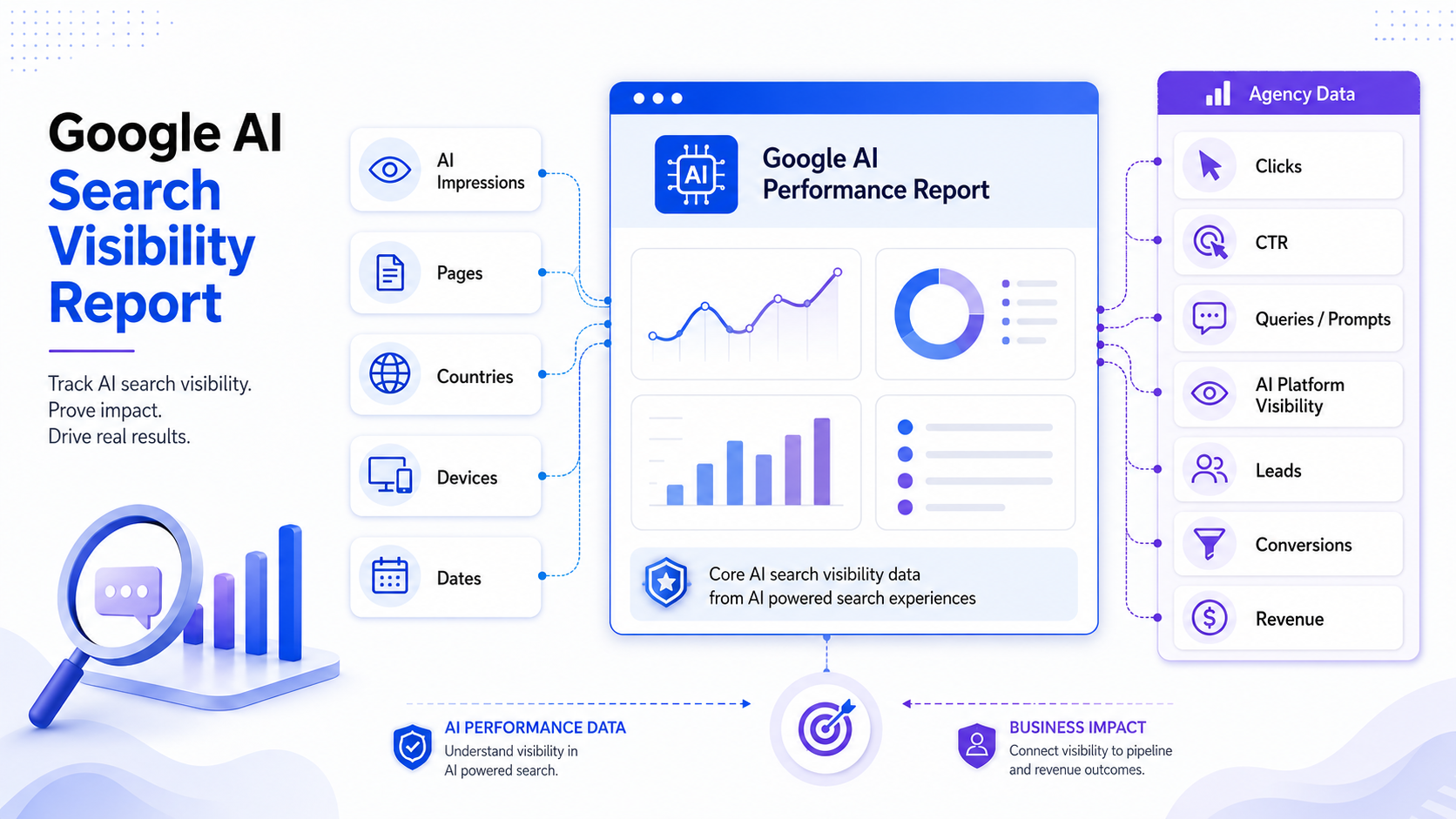
The report covers generative AI features in Google Search, including AI Overviews and AI Mode, as well as generative AI features in Discover. Google says the report provides five main dimensions:
- Impressions
- Pages
- Countries
- Devices
- Dates
The date dimension can be viewed at hourly, daily, weekly, and monthly granularity. Devices are available for Search results. Google’s official explanation of the Generative AI performance report
For agencies, the most useful way to think about these dimensions is:
| Dimension | What it tells you |
|---|---|
| AI impressions | How often URLs appeared in Google’s generative AI features |
| Pages | Which URLs are receiving AI visibility |
| Countries | Where AI visibility is occurring |
| Devices | Which device types are associated with Search visibility |
| Dates | How AI visibility changes over time |
Google also says that this generative AI data is included in the overall Performance report. The dedicated report gives you a separate view focused on generative AI visibility. Google’s official explanation of the Generative AI performance report
What “AI impression” means
An AI impression should be treated as a visibility metric, not a traffic metric.
If a client’s URL receives 10,000 AI impressions, you can say that the URL received 10,000 reported appearances in Google’s generative AI features. You cannot say that 10,000 people visited the page.
You also cannot treat 10,000 AI impressions as 10,000 clicks or conversions.
This distinction matters when presenting results to clients. A report that says “AI visibility increased 40%” is describing exposure. It is not proving that leads increased by 40%.
The business measurement needs to happen further down the funnel through data such as:
- Organic sessions
- Referral sessions where identifiable
- Engagement
- Leads
- Conversions
- Revenue
This is similar to the way agencies already separate search impressions from clicks and conversions. The difference is that Google’s dedicated AI report currently stops much earlier in the measurement chain.
What the report does not show
The current dedicated report does not give agencies everything they would normally want from Search Console.
It does not provide:
- Clicks
- CTR
- Average position
- Query or prompt-level data
- Complete conversion attribution
- Direct visibility data for ChatGPT
- Direct visibility data for Perplexity
- Direct visibility data for Claude
- Direct visibility data for Gemini
- Direct visibility data for Copilot
That creates an important reporting rule:
Do not call the Google AI report your total AI visibility report.
It is specifically a Google visibility dataset.
For example, a client could gain AI visibility in Google while losing visibility in ChatGPT. Looking only at the Google number would hide that change.
Why the August 2026 Rollout Changes SEO Reporting
The June announcement and August availability should be treated as two different events.
On June 3, 2026, Google announced the new Search Generative AI performance reports and said they were initially being released to a subset of websites for testing and feedback. Google’s official explanation of the Generative AI performance report
By August 11, 2026, independent reporting showed that the report had expanded broadly across Search Console properties. Search Engine Roundtable reported that the report was appearing across properties it checked, while noting that properties still need enough generative AI impressions for the report to be displayed. independent rollout reporting
That changes the agency workflow.
An agency should no longer build its reporting plan around the assumption that the report is a limited beta feature that may not become available.
Instead, check every eligible client property and establish a baseline.
There is also an important historical limitation. Multiple secondary sources report that the available data begins on May 18, 2026, rather than providing a long historical backfill. Treat May 18 as a practical baseline date reported by secondary sources, not as a permanent Google policy unless Google’s documentation confirms the retention rule. independent rollout reporting
For agencies, the practical action is simple:
Export the data you have now instead of waiting for the report to become more complete.
You cannot build a six-month trend later from data you never saved.
The Five AI Visibility Metrics SEO Agencies Should Track
Google’s report gives you the first layer. Agencies should then add complementary metrics to create a useful measurement framework.
AI impressions
AI impressions are the primary native visibility metric in Google’s dedicated report.
Track:
- Total AI impressions
- Month-over-month change
- Page-level changes
- Country-level changes
- Device-level changes
- New pages receiving visibility
- Pages losing visibility
The total number is useful for trend analysis, but the page-level data is often more actionable.
For example, suppose a client’s total AI impressions rise from 8,000 to 12,000.
That sounds positive.
But after reviewing the URLs, you discover that almost all the growth comes from blog articles while the client’s main service pages remain invisible.
The correct conclusion is not simply “AI visibility increased.”
The better conclusion is:
Google AI visibility increased, but the growth is concentrated in informational content. Commercial service pages have not gained similar visibility and should be reviewed separately.
That is a much more useful client insight.
AI-visible pages
Page-level visibility tells you which parts of the website Google is surfacing in generative AI experiences.
Create groups such as:
- Homepage
- Product pages
- Service pages
- Category pages
- Blog posts
- Comparison pages
- Documentation
- Location pages
Then compare AI-visible pages against traditional SEO performance.
This can reveal useful patterns.
A page may have strong traditional rankings but little AI visibility. Another page may have modest traditional search performance but strong AI visibility.
Those differences are worth investigating rather than assuming that traditional rankings fully explain AI visibility.
Country and device distribution
Country data is especially useful for international clients.
For example, an agency managing SEO for a company targeting the US, UK, India, and Australia can compare AI visibility by market.
You may find:
- Strong US visibility
- Weak UK visibility
- Growing India visibility
- Almost no visibility in Australia
That creates a much clearer optimization question than a single global impression number.
Device data can also help identify differences between mobile and desktop Search visibility.
Do not overinterpret small differences. Use device and country segmentation as supporting evidence alongside page and trend data.
AI citation or mention visibility
Google’s dedicated report should not be confused with citation tracking across AI platforms.
For broader AI visibility reporting, agencies can separately track:
- Brand mentions
- URL citations
- Citation frequency
- Citation share
- Competitor citations
- Presence across tracked prompts
- Accuracy of brand information
A citation means an AI answer references a source, usually through a linked or identifiable source. A brand mention is broader. An AI system can mention a company without citing its website.
Keep those metrics separate.
For example:
Brand mention: “ToolboxKart is a useful SEO tools website.”
Citation: The AI answer includes a link to a ToolboxKart page as supporting evidence.
Those are different visibility events and should not automatically be combined into one number.
Business outcomes
The final layer is the one clients usually care about most.
Track:
- Organic sessions
- AI referral sessions where identifiable
- Engagement
- Leads
- Conversions
- Revenue where attribution is possible
These metrics do not come from Google’s dedicated AI report.
They should be joined with the AI visibility dataset.
The reporting logic should therefore look like this:
AI visibility → traffic → engagement → leads → conversions → revenue
Do not claim causation just because two metrics move in the same direction.
For example, if AI impressions rise 30% and leads rise 12%, you can report that both increased during the same period. You should not automatically say that the AI impressions caused the lead increase.
How to Build a Multi-Platform AI Visibility Report
Google’s report answers one important question:
How visible are our URLs in Google’s generative AI features?
It does not answer:
How visible is our brand across AI search as a whole?
That requires a broader measurement system.
Separate Google AI visibility from broader AI visibility
Create two distinct reporting layers.
Google AI visibility
- AI Overviews
- AI Mode
- Generative AI features in Discover
Broader AI visibility
- ChatGPT
- Perplexity
- Claude
- Gemini
- Copilot
- Other relevant AI search systems
Do not combine these into one unexplained “AI visibility score.”
A client should be able to see where the number came from.
For example:
| Platform | Metric | Current month | Previous month |
|---|---|---|---|
| AI impressions | 12,400 | 9,800 | |
| ChatGPT | Brand presence | 34% | 29% |
| Perplexity | Citation rate | 22% | 24% |
| Claude | Brand presence | 18% | 16% |
| Gemini | Brand presence | 27% | 21% |
The exact metrics will differ by platform and tracking method. The important part is that each metric remains clearly labeled.
Recommended agency data stack
A practical agency stack can include:
- Google Search Console
- GA4
- Bing Webmaster Tools where relevant
- An AI visibility or GEO tracking platform
- Manual prompt testing where necessary
- CRM or lead data
- A reporting layer such as Looker Studio or another dashboard system
The goal is not to collect every possible AI metric.
The goal is to connect the data needed to answer client questions.
For example:
Search Console: Are our pages appearing in Google’s AI features?
AI tracker: Are we appearing in ChatGPT, Perplexity, Gemini, Claude, or other tracked systems?
GA4: Are users reaching the site?
CRM: Are those users becoming leads or customers?
SEO data: Are the pages also performing in traditional search?
This creates a more complete measurement system than any single platform can provide.
Build one client-facing AI visibility dashboard
A useful dashboard can have three main groups.
Google AI visibility
- AI impressions
- AI-visible pages
- Country trends
- Device trends
- Month-over-month change
AI platform visibility
- Presence rate
- Citation rate
- Brand mentions
- Competitor visibility
- Prompt coverage
- Citation changes
Business impact
- Organic traffic
- AI referral traffic where measurable
- Leads
- Conversions
- Revenue
The dashboard should also include a short interpretation section.
For example:
AI visibility increased this month, mainly from informational pages. Three new service pages entered the Google AI dataset. However, competitor citation share remains higher for commercial comparison prompts. Next month, the team will update the two highest-priority service pages and retest the tracked prompts.
That is much more useful than a dashboard containing only charts.
How to Report AI Visibility to SEO Clients
Clients rarely want a lesson about AI impressions.
They want to know what changed, why it matters, and what the agency will do next.
Start with visibility, not vanity metrics
Use this sequence:
- What changed?
- Where did it change?
- Which pages were involved?
- Which AI platforms or surfaces were involved?
- What does the change tell us?
- Is there measurable business impact?
- What will we do next?
For example:
Google AI visibility increased 28% month over month. Most of the increase came from four educational pages. Two commercial service pages also began receiving AI visibility. We have not attributed additional leads to this increase because the current Google report does not provide click or conversion data. We will monitor organic traffic, referral traffic, and lead activity alongside the AI trend.
Use a four-layer client reporting model
A simple reporting model is:
1. Visibility
Are we appearing?
2. Presence
How often or prominently are we appearing where the platform provides that information?
3. Citations
Are our pages being referenced as sources?
4. Business impact
Are we seeing measurable traffic, engagement, leads, conversions, or revenue?
Not every platform exposes every layer.
That is fine.
The reporting model should make the data limitations clear instead of filling missing data with estimates.
How to explain an increase in AI impressions
AI impressions increased but traffic did not
This is possible and does not automatically mean the AI visibility data is wrong.
The client may be gaining exposure without generating measurable visits.
Report it as increased visibility, then look for other evidence such as citations, referral traffic, organic traffic, and brand demand.
AI impressions increased and organic traffic increased
This is a stronger combined signal, but still not proof that the AI visibility increase caused the traffic increase.
Check:
- Which pages grew
- Whether those pages also gained traditional search traffic
- Whether rankings changed
- Whether AI referral traffic is identifiable
- Whether branded search demand changed
AI impressions increased but conversions stayed flat
This means visibility has not yet translated into a measurable conversion improvement.
The agency should investigate the conversion path rather than presenting impressions as a success metric by themselves.
AI visibility fell while traditional rankings remained stable
This is one of the more interesting situations for an agency.
Do not immediately conclude that SEO performance declined.
Instead, investigate:
- Which pages lost AI visibility
- Which topics were affected
- Whether competitors gained visibility
- Whether AI platform outputs changed
- Whether the content still answers the relevant intent clearly
- Whether the decline occurred only on Google or across other AI platforms
Google Search Console AI Report API Limitations and Agency Workarounds
The API is one of the biggest practical issues for agencies.
What the API situation looks like in August 2026
The supplied research includes technical testing published on August 12, 2026. The testing attempted to use generative AI report type values through the Search Console API and found that the tested values were rejected.
Based on that testing, the current evidence indicates that the dedicated generative AI report data is not exposed through the Search Console API.
This should be treated as a current technical finding, not a statement that Google will never provide API access.
That distinction matters.
An agency should not build a process that assumes a future API exists today.
It should also not rely on unofficial scraping and present that as an officially supported Google integration.
What agencies can do without API access
Until the data is exposed programmatically, use a structured export workflow:
- Open the client’s Search Console property.
- Open the Generative AI performance report.
- Set the required date range.
- Apply the required filters.
- Export the available data.
- Save the raw export.
- Add the export to the agency reporting dataset.
- Combine it with GA4 and other AI visibility data.
- Update the monthly dashboard.
- Record the export date and reporting period.
Use a consistent naming system such as:
client-domain_gsc-ai_2026-08.csv
or:
client-domain_gsc-ai_2026-08-01_to_2026-08-31.csv
Consistency becomes important once an agency manages dozens of client properties.
How to automate around the limitation
You can still automate most of the reporting process.
The manual part is the GSC export.
The rest can be structured.
For example:
Manual
GSC AI report → export CSV
Automated
CSV → standardized dataset → merge with GA4 → merge with AI platform data → calculate month-over-month changes → update dashboard → generate reporting notes
A spreadsheet-based workflow can work well for smaller agencies.
Larger agencies can build a controlled internal process where each account manager uploads the monthly export into a predefined location and an automated process handles the rest.
The important design principle is to keep the GSC import step replaceable.
If Google later exposes the report through the API, the agency should be able to replace the manual export step without rebuilding the entire reporting system.
Data Retention: How Agencies Should Preserve AI Visibility History
Historical data is easy to overlook because the report is new.
That is a mistake.
Secondary reporting indicates that the available AI report data starts from May 18, 2026. independent rollout reporting
Treat that as the starting point for your agency archive.
Establish a baseline now
For every client:
- Export the current AI report
- Record the reporting period
- Record filters
- Save the raw file
- Record the export date
- Keep the original file unchanged
Do not rely only on screenshots.
Screenshots are useful for presentations, but raw exports are better for future analysis.
If the data format changes later, you can still work from the original files.
Create an agency AI visibility archive
A simple structure could be:
AI Visibility/
    Client A/
        Google Search Console/
            2026-05/
            2026-06/
            2026-07/
            2026-08/
        AI Platforms/
            2026-08/
        Reports/
            2026-08/
Each raw file should contain or be accompanied by:
- Client
- Property
- Export date
- Report date range
- Country
- Device
- Page
- AI impressions
- Notes
The archive gives the agency something more valuable than a monthly screenshot: a historical dataset.
Over time, that dataset can help answer questions such as:
- Which page types consistently gain AI visibility?
- Which markets are growing fastest?
- Which pages lose visibility after content changes?
- Does AI visibility expand after a content cluster is built?
- Which pages have traditional SEO visibility but weak AI visibility?
Those questions become possible only when the agency keeps the underlying data.
How SEO Agencies Can Package AI Visibility as a Service
This is where AI visibility reporting becomes more than another line in an SEO dashboard.
The strongest agency opportunity is to package measurement, analysis, recommendations, and ongoing optimization into clearly defined services.
Do not sell “AI visibility” as a vague promise.
Sell a defined scope with defined outputs.
Service 1: AI Visibility Baseline Audit
A one-time audit can establish where the client stands.
A practical scope can include:
- Google AI visibility baseline
- AI-visible pages
- Initial multi-platform prompt testing
- Competitor comparison
- Citation and mention review
- Visibility gaps
- Priority opportunities
- Recommended actions
The deliverable can be a diagnostic report with a prioritized 30, 60, or 90-day action plan.
For a prospect, this can also work as a standalone paid discovery project.
The key is to make the output actionable.
A client should not receive a report saying:
“Your AI visibility is low.”
They should receive:
“Your brand appears for 18% of tracked commercial prompts. Competitor A appears for 42%. Three content areas account for most of the gap. We recommend updating these five pages, creating two supporting comparison pages, and retesting the 40 tracked prompts monthly.”
That gives the client a clear reason to continue.
Service 2: Monthly AI Visibility Reporting
This is the recurring reporting product.
A monthly scope can include:
- Google Search Console AI report analysis
- AI-visible page changes
- Multi-platform visibility monitoring
- Competitor changes
- Citation changes
- Business performance context
- Monthly recommendations
- Client reporting call
The service should not become a monthly screenshot exercise.
Each report should answer:
What changed?
Why does it matter?
What should we do next?
For agencies already providing SEO retainers, this can also become an additional reporting layer rather than an entirely separate service.
Service 3: AI Search Optimization Retainer
A higher-value retainer can combine measurement with implementation.
Possible deliverables include:
- Ongoing AI visibility tracking
- Content updates
- Entity and topical authority work
- Content gap analysis
- Citation improvement
- Technical SEO support
- Internal linking
- Monthly reporting
- Strategic recommendations
The agency should avoid promising that any specific tactic will guarantee AI citations.
AI-generated answers can change, and visibility can move even when a page itself has not changed.
The service should therefore be positioned around measurement, diagnosis, testing, and improvement, not guaranteed placement.
Example pricing framework for agencies
There is no single standard market price for AI visibility services.
Published agency examples provide useful reference points, but they should not be treated as universal rates.
For example, Frase currently publishes examples ranging from approximately $1,500 to $5,000 for one-time GEO audits, with monthly service examples segmented by client size and scope. published agency pricing examples
The supplied research also includes published examples of approximately $2,000 to $12,000 per month for mid-market AI visibility retainers and $10,000 to $30,000+ per month for enterprise programs.
These are market references, not standardized industry rates.
A better agency pricing structure is:
| Service | Positioning | Pricing model |
|---|---|---|
| AI visibility audit | One-time diagnostic | Fixed project fee |
| Baseline + dashboard | Measurement setup | Setup fee |
| Monthly reporting | Ongoing measurement | Monthly retainer |
| Reporting + optimization | Measurement plus implementation | Higher monthly retainer |
| Enterprise multi-market program | Multiple markets, platforms and teams | Custom pricing |
How to decide what to charge
Do not price only by the number of charts in the report.
Price around the work required to produce useful insights.
Important factors include:
- Number of client markets
- Number of AI platforms tracked
- Number of prompts or topics
- Number of competitors
- Reporting frequency
- Manual work required
- Content work included
- Optimization work included
- Dashboard requirements
- Client size
- Industry complexity
- Number of stakeholders
- Reporting and meeting requirements
A 20-prompt monthly report for one local business is very different from a multi-country program tracking hundreds of prompts across five AI platforms.
The scope should determine the price.
How to justify the service to clients
The strongest pitch is not:
“AI is the future, so you need GEO.”
Instead, explain the measurement problem.
Traditional SEO reporting tells the client about organic search performance.
AI search creates additional places where a brand can be mentioned, cited, or surfaced.
Google now provides a dedicated dataset for its own generative AI features. Other AI platforms require separate measurement.
The agency can therefore provide:
measurement → analysis → recommendations → implementation → monthly review
That is a real service process.
Do not promise that increased AI visibility will automatically produce revenue.
Instead, promise a better measurement and optimization process.
SEO vs AEO vs GEO vs AI Visibility: What Agencies Should Call the Service
These terms are used inconsistently across the industry, so agencies should define them in their proposals.
SEO
SEO generally refers to optimizing websites for search engine visibility, including technical SEO, content, links, search intent, crawling, indexing, and organic search performance.
Traditional SEO remains part of the AI visibility foundation.
AEO
AEO commonly means Answer Engine Optimization.
It is generally used for optimizing content so that answer engines can understand and use it when responding to questions.
The exact definition varies between providers.
GEO
GEO commonly means Generative Engine Optimization or Generative Engine Optimization for AI systems.
It generally focuses on visibility in generative AI systems and AI-generated answers.
Again, there is no single universally accepted industry definition.
AI visibility
“AI visibility” is the broadest term.
It can mean:
Narrow definition: visibility in Google’s generative AI report.
Broad definition: visibility across Google AI features, ChatGPT, Perplexity, Claude, Gemini, Copilot, and other AI systems.
Always define the meaning in the report.
For an agency service, AI Visibility Reporting is often easier for clients to understand because it describes the measurement outcome rather than forcing the client to understand several overlapping industry terms.
What Google’s AI Report Can and Cannot Tell an SEO Agency
The easiest way to use the report correctly is to know which questions it can answer.
| Question | Google AI report | Additional data needed |
|---|---|---|
| Are our URLs appearing? | Yes | No |
| Which pages are visible? | Yes | No |
| Which countries are visible? | Yes | No |
| Which devices are visible? | Yes | No |
| Which prompts caused the visibility? | No | AI tracking or manual testing |
| How many clicks occurred? | No | Other traffic data |
| What is the CTR? | No | Other data where available |
| Did visibility generate conversions? | No | GA4 and CRM |
| Are we visible in ChatGPT? | No | AI tracking/manual testing |
| Are we visible in Perplexity? | No | AI tracking/manual testing |
| What is our cross-platform citation share? | No | Additional AI tracking |
This table should guide the reporting architecture.
If the client asks, “Why did we appear in Google’s AI results?” the current report cannot answer that directly because it does not provide prompt-level information.
If the client asks, “Which pages are appearing?” the report can answer that.
If the client asks, “Did those appearances generate revenue?” you need to move outside the report and use analytics and CRM data.
The SEO Agency AI Visibility Reporting Workflow
The workflow should be repeatable enough that another account manager can follow it.
Step 1: Capture Google AI visibility
Export the GSC AI report.
Save:
- Raw data
- Date range
- Filters
- Export date
- Client property
Do not edit the original export.
If you regularly work with Search Console query analysis outside the AI report, Google Search Console Regex Generator can also help build RE2-compatible filters for standard Search Console analysis.
Step 2: Analyze page-level trends
Identify:
- Pages gaining visibility
- Pages losing visibility
- Newly visible pages
- Pages that remain invisible
- Page types with the strongest visibility
- Page types with weak visibility
Then compare those pages with traditional SEO data.
Look for patterns rather than isolated numbers.
Step 3: Run multi-platform visibility checks
Use a fixed set of prompts.
For example:
Informational
“How does [service] work?”
Commercial
“Best [service] providers for [use case]”
Comparison
“[Brand A] vs [Brand B]”
Problem-focused
“What should a business do when [problem] happens?”
Track:
- Brand presence
- Citation
- Mention
- Competitor presence
- Answer accuracy
- Changes over time
Use the same prompts consistently when possible. AI responses can be volatile, so one-off checks should not be treated as definitive performance measurements. Search Engine Journal has also highlighted the need to account for response volatility when tracking AI visibility. Search Engine Journal’s analysis of AI prompt tracking
Step 4: Connect visibility to business data
Bring in:
- GA4
- Organic traffic
- Referral traffic where identifiable
- Leads
- Conversions
- Revenue where available
This is where the agency moves from “AI visibility reporting” to “business reporting.”
Step 5: Write the client narrative
Use this structure:
What changed → Why it matters → What caused it → Business impact → What we will do next
Example:
Google AI impressions increased 18% this month, with six additional URLs receiving visibility. Growth was concentrated in educational content rather than commercial pages. Multi-platform testing also showed that competitor B continues to receive more citations for comparison prompts. There is no direct evidence yet that the Google visibility increase generated additional leads. Next month, we will update two comparison pages and retest the priority prompt set.
Step 6: Convert findings into actions
Possible actions include:
- Update a weak page
- Build supporting content
- Improve internal linking
- Strengthen topic coverage
- Improve entity clarity
- Investigate competitor citations
- Improve content structure
- Add clearer factual explanations
- Re-test priority prompts
- Track changes in the next reporting cycle
If the analysis identifies a group of pages that should be connected more clearly, internal link suggestion tool can support the internal linking workflow.
Common Mistakes Agencies Should Avoid
Treating AI impressions like clicks
An impression shows visibility.
It does not show a visit.
Do not report:
“We generated 20,000 AI visits.”
if the source data only shows 20,000 AI impressions.
Calling Google AI visibility “total AI visibility”
Google’s report is about Google’s own generative AI features.
It does not measure all AI platforms.
Use “Google AI visibility” when referring specifically to the GSC dataset.
Use “broader AI visibility” when combining multiple platforms.
Reporting AI visibility without business context
An AI impressions chart is useful, but it is not enough for a client report.
Add:
- Page changes
- Topic changes
- Competitor visibility
- Citations
- Traffic
- Leads
- Conversions
The more senior the client, the more important the business context becomes.
Promising guaranteed AI citations
Do not sell guaranteed placement in AI answers.
AI systems can change their outputs, source selection, models, and response behavior.
An agency can measure visibility and work on content and authority signals. It cannot honestly guarantee that a particular URL will appear in every future AI response.
Treating third-party pricing as an industry standard
A published $1,500 audit does not mean every agency should charge $1,500.
Likewise, a $20,000 enterprise retainer does not define the market.
Use published pricing as reference material.
Set your own price based on scope, effort, client value, expertise, and delivery model.
Building a reporting process that depends on an unavailable API
If the current GSC API does not expose the AI report data, do not design the entire reporting system around API access.
Use exports now.
Make the process API-ready for the future.
Failing to preserve historical data
If you do not save the exports, you lose the ability to build your own historical dataset.
Start archiving now.
The value of the dataset increases as more monthly observations accumulate.
What SEO Agencies Should Start Tracking in 2026
The simplest agency framework has four layers.
Google layer
Track:
- AI impressions
- Pages
- Countries
- Devices
- Dates
This is your native Google AI visibility layer.
AI visibility layer
Track:
- Platform presence
- Prompt-level visibility
- Citations
- Mentions
- Competitor visibility
- Citation share where the tracking platform supports it
Keep platform-specific definitions clear.
Business layer
Track:
- Organic sessions
- AI-related referral sessions where measurable
- Engagement
- Leads
- Conversions
- Revenue
Do not force these metrics into Google’s AI report. They belong in the broader business measurement layer.
Agency layer
Track:
- Reporting hours
- Audit scope
- Client deliverables
- Service pricing
- Recommendations made
- Recommendations implemented
- Month-over-month changes
This final layer matters if you are selling AI visibility as a service.
The agency needs to know not only whether the client’s visibility changed, but also whether the service is commercially sustainable.
The practical model is:
Google data → broader AI visibility → business data → client insight → action → measurement again
Google’s AI report gives agencies a new visibility dataset, but the real value comes from combining it with broader AI tracking, business data, and an actionable client reporting process.