How to Use This Tracker (Read This First)
Every entry below is tagged Core, Spam, or Discover, because the recovery action is different for each. Scroll to the top tag first, then check the date.
Not every Google update is a core update, and the difference changes what you should do next. Core updates re-evaluate content quality across the entire index. They are not penalties, and there is no fix to apply during the rollout itself.
Spam updates work differently. They target specific violations like keyword stuffing, link schemes, or scaled content abuse, and they often move much faster than a core update.
The March 2026 spam update rolled out and completed in under 20 hours, while a typical core update runs for one to two weeks.
Discover updates are narrower still. The February 2026 Discover update affected the Discover feed only, marking the first time Google publicly labeled an update as Discover-only, separate from standard search rankings.
Google ships all three types in close succession sometimes. The February 2026 Discover update, the March 2026 spam update, and the March 2026 core update all landed within about five weeks of each other. A tracker that lists all three identically will mislead you into applying the wrong playbook.
The log below sorts newest first and tags each entry by type. Check the tag before you check the date, because the recovery framework two sections down only applies to one of the three types.
| Update Type | What It Targets | Does the Recovery Framework Apply? | Example from the Log |
|---|---|---|---|
| Core Update | Overall content quality and relevance, site-wide | Yes | May 2026 Core Update |
| Spam Update | Specific manual-style violations like link schemes | No, use spam policy guidance instead | March 2026 Spam Update |
| Discover Update | Discover feed surfacing only, not search rankings | No, check Discover-specific guidance | February 2026 Discover Update |
The Core Update Recovery Framework (Use This Every Time)
This sequence works the same way for every core update Google ships, which is exactly why it sits above the log instead of getting repeated inside every entry below.
Four steps. Run them in order. Skipping ahead to content edits before you confirm the date range almost always wastes a week.
Step 1: Confirm Which Update Actually Hit You
Match your traffic-drop date against the rollout window of the topmost entry in the log below. If your drop started mid-window, you were caught in that update, not a separate one.
This sounds obvious, but it trips up more people than any other step. Traffic dips happen for reasons that have nothing to do with Google: seasonal demand shifts, a broken sitemap, a CDN outage.
Pull your Search Console performance data and overlay it against the exact start and end dates in the log entry. Google posts every official update as an incident entry on the Search Status Dashboard, with start and end timestamps in US/Pacific time, so that dashboard is the only date source worth trusting.
If your dates do not line up cleanly with any entry, the cause is probably something else entirely. Check technical issues first before assuming an algorithm update touched you at all.
If you want a deeper walkthrough of pulling and comparing date ranges inside Search Console, a guide on reading Search Console performance reports covers that mechanic in more depth than this section needs to.
Step 2: Direct Hit vs. Collateral Churn
If the drop is isolated to one template or content hub while the rest of the domain holds steady, that is a direct quality signal on those pages, not a domain-wide reassessment.
This distinction matters because the fix is completely different depending on which one you are looking at. A direct hit means specific pages got reassessed and found wanting on their own merits.
Collateral churn looks different. Your whole site moves a few positions in either direction without any single section standing out, which usually means the update shifted the competitive landscape around you rather than judging your content directly.
A spam update penalizes specific tactics, a Discover update affects how content surfaces in personalized feeds, and a broad core update changes how Google values content quality across all of search. Knowing which pattern you are seeing tells you whether to rewrite specific pages or wait out a broader recalibration.
Pull a page-level report and sort by traffic change. If three or four URLs account for most of the drop, you are looking at a direct hit. If the drop spreads evenly, it is collateral.
Step 3: Run the Mobile Core Web Vitals Check
Pages with slow loading and sluggish interactivity tend to underperform competitors covering the same topic during a core update rollout. Check this before touching content.
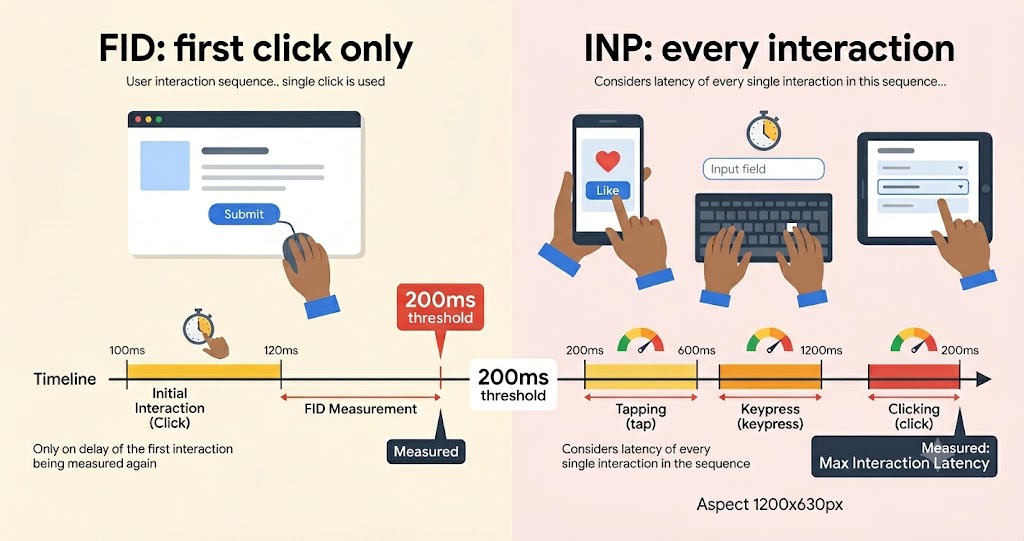
Core Web Vitals measure three things: how fast your main content loads, how quickly the page responds to a tap or click, and whether elements jump around while loading. A good score requires Largest Contentful Paint under 2.5 seconds, Cumulative Layout Shift under 0.1, and Interaction to Next Paint under 200 milliseconds.
INP replaced an older metric called FID. Google officially retired First Input Delay in March 2024 and replaced it with Interaction to Next Paint, which tracks every interaction on the page instead of only the first one.
This matters for anyone still optimizing against old advice. If a guide tells you to fix FID, it is describing a metric Google stopped using years ago.
The thresholds themselves have not changed since the switch, but plenty of sites that passed under the old FID rules are quietly failing INP now and have not noticed. Run a fresh PageSpeed Insights check on mobile specifically, since field data skews worse there than desktop.
If you need a deeper walkthrough on fixing the specific scores, a guide on fixing Core Web Vitals issues covers the implementation side this section does not have room for.
Step 4: Pattern-Check Your Own History Against This Tracker
If your traffic dropped in both the March 2026 and May 2026 entries below, the issue is systemic to your content or templates, not a one-time misjudgment by either update.
This step only works because this page is a running log, not a single-event article. A reader looking at one update in isolation cannot do this check at all.
Open your analytics and mark every date range in the log where your traffic moved, up or down. Two or more drops in a row at the same template or content type is a signal worth investigating on its own.
| Pattern Observed | Likely Cause | Recommended Next Step |
|---|---|---|
| Hit once, recovered fully | Normal volatility during rollout | Wait, monitor, no action needed |
| Hit by two consecutive core updates | Systemic content or template issue | Full content audit on affected pages |
| Hit by a core update and a spam update close together | Combined effect, spam issues compounded the core hit | Address spam policy violations first |
| Traffic recovers between updates but drops again each time | Site sits near a quality threshold Google keeps re-testing | Deeper E-E-A-T and authorship review |
If your pattern looks like the third or fourth row, that is usually the point where a structured audit finds something a quick scan misses.
Google Core Update Log (Newest First)
May 2026 Core Update (Current — Confirmed Complete)
Confirmed complete by Google on June 2, 2026, after a 12-day rollout that began May 21.
The May 2026 core update started on May 21, 2026 and took about 12 days to roll out, completing on June 2, 2026, making it the second core update of 2026. Google described it on the Search Status Dashboard as a regular update designed to better surface relevant, satisfying content for searchers from all types of sites.
The rollout was not quiet. It was announced on a Thursday afternoon and was already being felt by Saturday, May 23rd, with more large ranking movements the following Saturday, May 30th, and additional volatility right before Google marked it done.
Google did not share new guidance specific to this update beyond its standing position that there are no specific actions to take to recover, and that a negative ranking impact may not mean anything is wrong with your pages. That advice has not changed across multiple update cycles, which is part of why the framework above exists separately from this log.
Known Search Console Bug During This Rollout
If your Links report still shows placeholder data instead of current backlinks, that is a known bug, not a real backlink loss. Cross-check with a third-party backlink tool instead.
Search Console’s Links report started showing old data starting May 21, 2026, the same day this core update began rolling out. Some sites saw the report show zero external links, while others saw drops of 87 to 90 percent compared to the week before.
The issue was not fixed until June 12, when fresh link data returned, weeks after the core update itself had already completed. Google’s own public comments put the idea that a core update caused this bug to rest, and the consensus among practitioners is that the two events are unrelated despite landing on the same day.
If you tried to assess this update’s impact using backlink counts during that window, the data you saw was not real. Re-pull your link data now that the fix is live and use that as your new baseline.
March 2026 Core Update
Completed April 8, 2026, after a 12-day rollout that began March 27.
Google confirmed the March 2026 core update finished rolling out, with the dashboard updating at 6:12 AM PDT on April 8 to mark the rollout complete. The update began on March 27 at 2:00 AM PT, for a total rollout of 12 days, faster than the December 2025 core update’s 18 days.
Google described it only as a regular update and did not publish a companion blog post explaining specific goals. That is consistent with how Google has handled most core updates since.
March 2026 Spam Update
This was not a core update. It targeted manual-violation patterns like link schemes and scaled content abuse, so the recovery framework above does not apply here the same way.
The March 2026 spam update rolled out and completed in under 20 hours on March 24 to 25, making it the shortest confirmed spam update in the dashboard’s history. It landed two days before the core update that followed it.
If you saw a sudden, sharp drop rather than a gradual shift, and your site relies on manipulative backlinks or thin AI-generated pages, this spam update is the more likely cause, not the core update that came after it.
February 2026 Discover Core Update
This update only affected the Discover feed, not standard search rankings, so it belongs in this log for completeness, not as a search-ranking event.
The February 2026 Discover update completed on February 27, 2026 after a 22-day rollout, and was the first update Google publicly declared as Discover-only. If your organic search traffic dropped during this window but your Discover traffic stayed flat, this update was not the cause.
In Search Console, switch the Search type filter to Discover before drawing any conclusions about this entry. If Discover traffic dropped in February specifically, that points here. If standard search traffic dropped instead, look at the spam or core updates that followed it.
Pattern continues backward: December 2025 Core Update, and earlier cycles, each following the identical template above. New entries get added above May 2026 as future updates are confirmed, demoting it to archive status.
verify current details at the Google Search Status Dashboard for any update that lands after this page was last refreshed.