Human approval gates are one of the simplest ways to reduce risk when an AI agent can take real actions. Instead of asking a person to watch every step, the workflow pauses only when an action crosses a defined risk boundary, such as sending money, publishing content, deleting data or changing access.
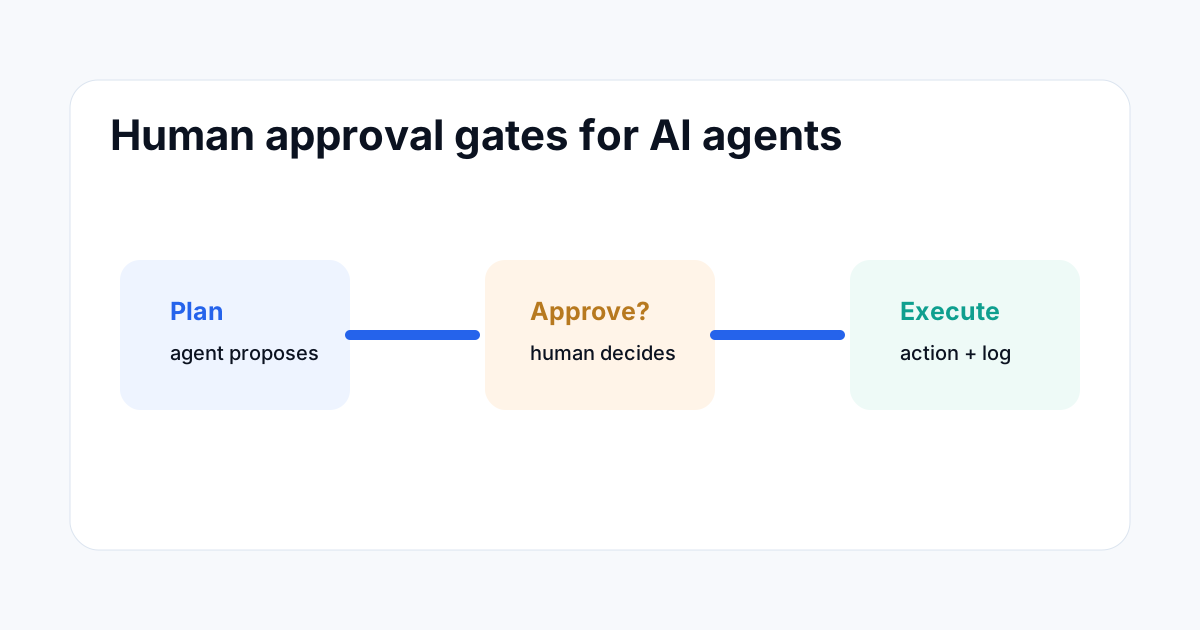
What a human approval gate does
An approval gate separates planning from execution. The agent can gather information, prepare a draft or calculate a proposed action. Before the system performs the sensitive operation, a human gets a clear request with enough context to approve or reject it.
This is different from a vague rule saying “human oversight is required.” A real gate is an enforceable control in the workflow.
Which actions should require approval
| Action | Typical control |
|---|---|
| Low-risk lookup | Automatic |
| Create a draft | Automatic with logging |
| Send an external message | Approval before send |
| Make a payment | Approval plus amount limit |
| Delete production data | Approval with strong authentication |
Use risk, not every action, as the trigger
If every tool call creates an approval request, users will approve prompts without reading them. The better design is to classify actions by risk. Read-only work can often run automatically. External communication, financial activity, destructive changes and permission changes should normally have stronger controls.
The exact threshold depends on the application. A five-dollar purchase and a five-thousand-dollar purchase should not necessarily use the same approval policy.
What the approval request should contain
An approval request should be specific. Show the action, target, important inputs, expected result, estimated cost and reason for the request. Where possible, show the exact change rather than a vague sentence such as “Approve this action?”
For a content workflow, show the final text and destination. For a deployment, show the files or release identifier. For a payment, show amount, merchant and currency.
Keep approval separate from the AI model
The model should not be the final authority over its own permission. The surrounding application should enforce whether an action is allowed and whether an approval is present.
Cloudflare's agent documentation shows this pattern with approval-aware tools and durable workflow pauses. The same architectural idea can be implemented in other stacks: the workflow engine owns the pause and resume behavior, while the model proposes the action.
Use timeouts and rejection paths
An approval request should never wait forever. Set a clear timeout and define what happens when the user does not respond. Depending on the workflow, that can mean cancelling the action, escalating to another reviewer or returning the task to a queue.
Rejection should also be a first-class state. Record why an action was rejected when the workflow needs that information for later evaluation.
Log the decision
For high-impact actions, keep an audit record of who approved the request, what was approved, when it was approved and what the agent eventually executed. The log should link the decision to the action so that a later reviewer can reconstruct the event.
This is especially useful when a workflow contains multiple steps. The approval should cover a defined action or scope, not an unlimited permission for the rest of the session.
Example: ecommerce agent
Imagine an AI shopping agent that searches for a laptop. It can compare products and summarize options automatically. When it finds the best match, it can prepare checkout details and request approval only when the final price, seller and shipping details are known.
The approval can include a spending cap. If the seller changes, the price moves beyond the approved limit or the shipping destination changes, the workflow should require a new approval rather than reusing the old one.
Example: content publishing agent
A content agent can research a topic, draft an article, check links and prepare metadata without human intervention. Publishing to a production site is a separate step. Put that action behind an approval gate that shows the URL, title, content summary, image and deployment diff.
This keeps the speed benefits of automation while preserving editorial control over the final public action.
How approval gates fail
The most common failure is putting an approval prompt too late. By then, the agent may already have performed the risky part. Another failure is making the prompt too vague for the reviewer to understand what will happen.
A third failure is allowing the model to edit the approval request itself. The approval record should come from trusted application state, not from free-form model output.
Human checkpoints without slowing everything down
Use automatic checks for low-risk operations and reserve human review for events that matter. Combine amount thresholds, destination allowlists, data classifications and action types.
Over time, review the approval logs. If a class of actions is consistently approved with no incidents, it may be a candidate for a lower-risk path. If reviewers frequently reject an action, tighten the workflow or improve the agent's preparation step.
Related ToolBoxKart guides
For the overall system design, read the AI Agent Architect guide. For access controls, see How to Audit AI Agent Permissions. For operational records, use AI Agent Audit Logs: What You Should Record. For payment-specific controls, read AI Agent Payment Trust Standards.
Frequently asked questions
Does every AI agent need human approval?
No. Approval is most useful for actions that create meaningful external impact, financial risk, destructive changes or permission changes.
Should the AI model control the approval itself?
No. The application or workflow engine should enforce the approval requirement and resume only when the required decision is present.
What happens when nobody approves?
Use a defined timeout and an explicit rejection or escalation path. Never allow an important action to remain in an unknown pending state indefinitely.
Sources
- Cloudflare Agents — Human-in-the-loop patterns
- OpenAI — Keeping your data safe when an AI agent clicks a link
- Visa Developer — Trusted Agent Protocol