Wait — which OpenClaw? (And what “local AI agent” actually means here)
OpenClaw (github.com/openclaw/openclaw) is a self-hosted agent runner — not a multi-agent framework, not a hosted API wrapper, and not the claw machine controller that ranks above it in Google.
When you search “OpenClaw AI agent,” you get noise: a claw machine controller repo, vague results for “OpenCog,” and a few unrelated GitHub projects. This article is specifically about the autonomous agent runner that executes tool-use loops on your own hardware.
“Local” here means the inference runs on your machine. OpenClaw can optionally call cloud APIs, but its default setup runs a local LLM through Ollama — no per-token charges, no data leaving your network. This is a different category from AutoGen (a multi-agent framework) or n8n with AI (a hosted automation service). OpenClaw is a standalone process that runs on your Mac, calls tools, completes tasks, and can message you on Telegram when it’s done.
One more clarification: this article uses the Model Context Protocol (MCP), Anthropic’s 2024 standard for agent tool communication. If you’ve seen MCP mentioned in agent docs and weren’t sure if it’s relevant to local setups — it is, and we’ll cover it.
What makes OpenClaw different from cloud AI agents?
Cloud agents like OpenAI Assistants or Claude’s API-based agents run their inference on hosted hardware. You send a request, pay per token, and receive a response. You have no control over where your data goes during processing.
OpenClaw runs the entire decision loop on your machine. The model, the tool calls, the retry logic — all of it executes locally. You send no tokens to a hosted endpoint unless you explicitly configure a cloud model as the backend.
This matters for three distinct reasons: cost at scale, data control, and uptime independence. At low usage volumes, cloud APIs are often cheaper. As task volume grows, the economics flip — and they flip faster than most API cost calculators suggest.
How the ReAct loop works in OpenClaw (vs cloud agent execution)
OpenClaw runs a think-act-observe loop entirely on your machine — every tool call, every decision step, every retry happens without a network request to a hosted model.
The ReAct (Reasoning + Acting) pattern works like this: the model receives a task, reasons about what tool to call, executes the tool, observes the result, and decides whether the task is complete or another step is needed. OpenClaw implements this loop as a local Python process. It reads a task, queries the local LLM via Ollama’s API at localhost:11434, parses the tool call from the model’s JSON output, runs the tool, and feeds the result back into the next reasoning step.
Each step is logged in your terminal. You can watch the agent work through multi-step SEO tasks in real time, which is useful for debugging task definitions.
Why MCP matters for local agents in 2025–2026
MCP (Model Context Protocol), released by Anthropic in November 2024, is now the de facto standard for how agents expose and consume tools — and OpenClaw supports it.
Before MCP, every agent framework defined its own tool schema format. LangChain used one convention, AutoGen another, custom runners invented their own. MCP standardizes the interface: tools are described in a JSON schema that any MCP-compatible agent can read and call. This means tools you build for OpenClaw can also run in other MCP-compatible agents without modification.
For local setups, MCP compatibility matters because it unlocks a growing ecosystem of pre-built tool servers — file readers, web scrapers, calendar connectors — without writing integration code from scratch. Verify current MCP tool server availability at the official MCP documentation.
Cost reality: OpenClaw vs OpenAI API vs Anthropic API
The per-token pricing pages on OpenAI and Anthropic’s sites are not useful for making a real budget decision. What you need is cost per workflow at your actual volume — and that number looks very different.
OpenClaw’s local inference cost is essentially the electricity to run your Mac Mini plus the time it took to set things up. There is no per-task charge, no rate limit at the API level, and no billing surprise at the end of the month.
The tradeoff is inference speed and model quality ceiling. A 7B–8B local model is meaningfully weaker than GPT-4o. Whether that gap matters depends entirely on your task.
Real cost at 500 tasks/month: a worked example
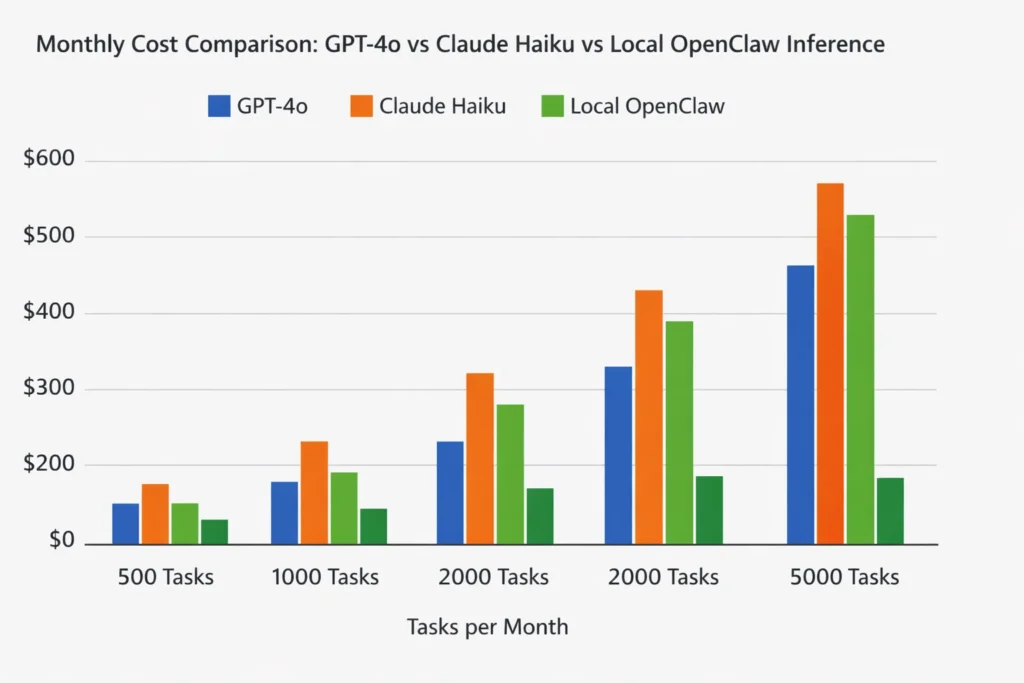
At 500 SEO automation tasks per month — each task averaging 2,000 input tokens and 500 output tokens — GPT-4o costs approximately $6.25; Claude Haiku costs roughly $0.44; OpenClaw on a Mac Mini costs the electricity to run it (~$2–4).
These estimates use current published rates (verify at OpenAI pricing and Anthropic pricing — both accessed March 2026). GPT-4 prices have dropped multiple times since 2023; any comparison table more than six months old is likely wrong.
| Platform | 500 tasks/month | 2,000 tasks/month | Data leaves your machine | Min. setup time |
|---|---|---|---|---|
| GPT-4o | ~$6.25 | ~$25 | Yes | 5 min |
| Claude Haiku 3.5 | ~$0.44 | ~$1.75 | Yes | 5 min |
| Claude Opus 4 | ~$37.50 | ~$150 | Yes | 5 min |
| OpenClaw (Llama 3.1 8B) | ~$2–4 electricity | ~$2–4 electricity | No | 30–60 min |
At 2,000 tasks per month, the electricity cost of local inference is fixed while cloud API costs scale linearly. The break-even point against Claude Haiku — already the cheapest capable hosted option — is roughly 4,000–5,000 tasks per month, depending on task complexity.
When cloud APIs are still the right call
If your tasks require vision, real-time web access, or the reasoning ceiling of Claude Opus or GPT-4o, a local 7B–70B model will fall short — and the API cost is justified.
Specific cases where cloud wins: processing screenshots of competitor SERPs, reasoning across documents longer than 32K tokens, or tasks where output quality directly affects client-facing deliverables. A local Llama 3.1 8B model produces good structured outputs for classification and generation tasks, but it makes more errors on complex multi-step reasoning chains. Llama 3.3 70B (released December 2024) narrows this gap significantly, but requires at least 40GB of unified memory — that means a Mac Studio or Mac Pro, not a Mac Mini with 16GB.
Installing and running OpenClaw on a Mac Mini: step-by-step
This section assumes a Mac Mini with Apple Silicon (M2 or later). Intel Mac instructions exist in the OpenClaw docs, but the install path differs — particularly around the Python dependency build chain.
What you need before you start
A Mac Mini M2 or later with 16GB RAM is the minimum for running Llama 3.1 8B at useful speeds — 8GB RAM technically works but introduces queuing delays above 3–4 concurrent tool calls.
Before starting, confirm:
- macOS Ventura 13.3 or later
- At least 20GB free disk space (model weights are ~4.7GB for Llama 3.1 8B in GGUF format)
- Python 3.11 (not 3.12 — some OpenClaw dependencies have not yet published 3.12-compatible wheels)
- Xcode Command Line Tools:
xcode-select --install
Installing Ollama and pulling the right model for SEO tasks
Install Ollama with one command — curl -fsSL https://ollama.ai/install.sh | sh — then pull Llama 3.1 8B, which outperforms Mistral 7B on structured text extraction tasks relevant to SEO.
After install, start the Ollama daemon with the current syntax (post-v0.1.20):
ollama serve
Then pull your model in a separate terminal tab:
ollama pull llama3.1:8b
Old guides use ollama run to start the daemon, which was deprecated. If you follow a 2023-era install guide and see errors, the startup command is likely the cause.
A note on Apple MLX vs GGUF: Ollama uses GGUF format by default, which runs well on Apple Silicon via llama.cpp. Apple’s MLX framework (v0.18+, 2025) offers 2–3x faster inference on M-series chips for certain model architectures. OpenClaw can use MLX as the inference backend, but the setup requires the Apple MLX GitHub repo and a separate model conversion step. For most SEO automation tasks where latency matters less than throughput, GGUF via Ollama is the simpler starting point.
Installing and configuring OpenClaw
Clone the repo, set your config.yaml to point at localhost:11434 (Ollama’s default port), and run python agent.py — if you see the ReAct loop output in your terminal, the agent is running.
git clone https://github.com/openclaw/openclaw.git
cd openclaw
python3.11 -m venv venv
source venv/bin/activate
pip install -r requirements.txt
Then edit config.yaml:
model_backend: ollama
ollama_url: http://localhost:11434
model: llama3.1:8b
max_steps: 10
Run the agent:
python agent.py --task "Generate 5 title tag variations for a page about running shoes"
You should see the ReAct loop steps printed in your terminal: a reasoning step, a tool call, an observation, and a final output.
Common install failures on Apple Silicon (and how to fix them)
The most common failure on Apple Silicon is a pip package compiled for x86 — fix it by explicitly running pip install --platform macosx_11_0_arm64 before the requirements install.
Other frequent failures:
Port conflict on 11434: Ollama may already be running as a background process. Check with lsof -i :11434 and kill the existing process if needed.
llama.cpp compilation error during pip install: This happens when Xcode Command Line Tools are outdated. Run softwareupdate --install -a and then xcode-select --install again.
Python version mismatch: If you have multiple Python versions via Homebrew, confirm python3.11 is resolving correctly with which python3.11. If not, use the full Homebrew path: /opt/homebrew/bin/python3.11 -m venv venv.
Slow first inference: The first run cold-loads the model weights into unified memory. Subsequent requests are significantly faster. Don’t benchmark from the first call.`
Connecting OpenClaw to Telegram and Slack for real automations
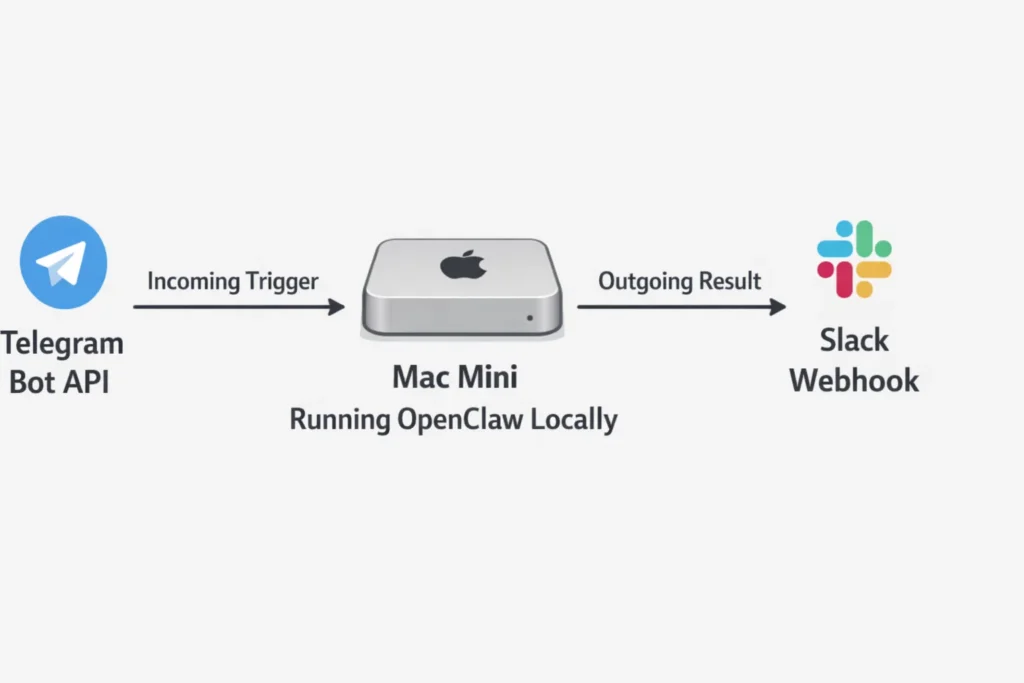
Running OpenClaw from a terminal is useful for testing. For real automation value, you want to trigger tasks from a Telegram message and receive results in Slack — without leaving your terminal open.
Setting up a Telegram bot that triggers OpenClaw
Create a Telegram bot via BotFather in 60 seconds, paste the token into OpenClaw’s integrations.yaml, and your agent will start receiving and responding to Telegram messages through its ReAct loop.
In Telegram, open a chat with @BotFather, run /newbot, follow the prompts, and copy the token. Then add it to your OpenClaw config:
telegram:
  enabled: true
  bot_token: "YOUR_BOT_TOKEN_HERE"
  mode: polling
Full Telegram Bot API documentation is at core.telegram.org/bots/api.
Polling mode for local testing (no public URL needed)
Polling mode makes OpenClaw periodically ask Telegram’s servers “any new messages?” — roughly every second. This works behind NAT, behind a home router, and without any port forwarding or public IP address.
The tradeoff is a ~1-second response delay and the need to keep the process running. For development and personal automation, this is the correct default. Set mode: polling in your integrations.yaml and OpenClaw handles the rest.
Webhook mode for always-on Mac Mini deployments
Webhook mode lets Telegram push messages to your agent instantly instead of waiting for OpenClaw to poll. This requires a publicly accessible HTTPS URL.
For a Mac Mini running 24/7 on your home or office network, Cloudflare Tunnel is the cleaner long-term option — it exposes a local port via a persistent public URL with no dynamic DNS setup. For quick testing, ngrok works:
ngrok http 8080
Paste the generated HTTPS URL into your OpenClaw webhook config and Telegram will deliver messages directly.
Sending OpenClaw outputs to a Slack channel
Create a Slack App, enable Incoming Webhooks, copy the generated URL into OpenClaw’s config, and every completed agent task will post its output directly to your chosen channel.
In Slack: go to api.slack.com/apps, create a new app, navigate to “Incoming Webhooks,” activate it, and add a webhook to your chosen channel. You’ll receive a URL in the format https://hooks.slack.com/services/....
Add it to integrations.yaml:
slack:
  enabled: true
  webhook_url: "https://hooks.slack.com/services/YOUR/WEBHOOK/URL"
  notify_on: task_complete
Full Slack webhook documentation is at api.slack.com/messaging/webhooks. After this, any task you trigger from Telegram produces a Slack notification when done.
Best use cases for OpenClaw right now: SEOs and developers
The install is done. The question is what to actually run.
SEO tasks that work well on local models today
Title tag variation generation, search intent classification, and internal link anchor text suggestions all run reliably on Llama 3.1 8B locally — these are structured text tasks with short output windows that don’t stress the model.
| Task | Works on 7B locally? | Works on 70B? | Needs cloud? | Why |
|---|---|---|---|---|
| Title tag variations | Yes | Yes | No | Short structured output |
| Search intent classification | Yes | Yes | No | Classification, not generation |
| Internal link anchor suggestions | Yes | Yes | No | Pattern matching on existing text |
| Content brief generation | Partial | Yes | Sometimes | Degrades on complex topics |
| SERP feature analysis (text) | Yes | Yes | No | Structured extraction |
| Long-document summarization (>32K) | No | No | Yes | Exceeds local context window |
| Competitor backlink intent analysis | Partial | Yes | Sometimes | Requires nuanced reasoning |
One practical note for SEOs working with client data: running this locally means client website data — URLs, content, audit results — never leaves your machine. For agencies with GDPR obligations or client contracts that restrict data processing locations, this is a legitimate compliance reason to use local inference, not just a cost argument.
SEO automation workflows you can run locally are worth bookmarking — they extend what OpenClaw does into repeatable pipeline templates.
Developer automation tasks worth running locally
Commit message generation and PR description drafting are the highest-ROI developer tasks for local agents — they run in under 3 seconds on an M2 Mac Mini and eliminate a recurring friction point that most teams never bother automating.
Additional tasks that work well:
README drafting from code: Point the agent at a repo directory, ask it to read the main file and generate a README. Llama 3.1 8B handles this reliably for most utility scripts and single-purpose tools.
Code review summaries: Feed a diff to the agent, ask for a plain-English summary of what changed and any obvious issues. Not a replacement for real code review, but useful for async standup context.
GitHub Issues triage drafts: The agent reads an issue title and body, classifies it (bug / feature / question), and drafts a first-response template. This is one of the highest-volume low-complexity tasks in developer workflows.
Tasks still better handled by cloud APIs (be honest)
Real-time web lookup, vision-based tasks, and reasoning across documents longer than 32K context still belong on cloud APIs.
Local models also struggle with tasks where subtle factual errors are costly — medical, legal, or financial content where a plausible-but-wrong answer causes real damage. For agencies: content that goes directly to publication without human review is risky on a 7B local model. Content that feeds a human editor’s workflow is fine.
The privacy counterargument still holds here: if a task requires cloud-level quality AND involves client data, the right answer is to run the cloud API with your own API key under a data processing agreement — not to use a third-party hosted agent service that may store completions for model training. Running how to reduce your OpenAI API spend tactics alongside a local setup gives you the best of both.
Quick-start checklist: running OpenClaw in under 30 minutes
If you already know what OpenClaw is and just need the steps, this checklist covers everything from install to first Telegram message in order.
1. Hardware check
- Mac Mini M2 or later, 16GB RAM minimum
- 20GB free disk space
- macOS Ventura 13.3+
2. Install dependencies
- Xcode CLI tools:
xcode-select --install - Python 3.11: confirm with
python3.11 --version
3. Install Ollama
curl -fsSL https://ollama.ai/install.sh | sh- Start daemon:
ollama serve - Pull model:
ollama pull llama3.1:8b
4. Install OpenClaw
git clone https://github.com/openclaw/openclaw.gitcd openclaw && python3.11 -m venv venv && source venv/bin/activatepip install -r requirements.txt
5. Configure
- Edit
config.yaml: setollama_url: http://localhost:11434andmodel: llama3.1:8b - Test run:
python agent.py --task "List 3 meta description improvements for a homepage about coffee"
6. Connect Telegram
- Create bot via
@BotFather, copy token - Add to
integrations.yamlwithmode: polling - Restart agent — send a task from Telegram
7. Connect Slack (optional)
- Create Slack App at api.slack.com/apps
- Enable Incoming Webhooks, copy URL
- Add to
integrations.yamlunderslack.webhook_url
Total time from zero to first Telegram-triggered task: 25–40 minutes on a clean Mac Mini.
FAQ
Does OpenClaw work on Apple Silicon Mac (M1, M2, M3, M4)?
Yes, with the correct setup path. Use the ARM64-compatible pip install, run Ollama with ollama serve (not the deprecated daemon command from 2023 guides), and confirm Python 3.11 resolves to the Homebrew ARM64 build. M1 Macs with 8GB RAM will work but show speed degradation on tasks with many sequential tool calls. M2 and later with 16GB is the practical minimum for smooth operation.
Can OpenClaw run without an OpenAI or Anthropic API key?
Yes. With Ollama as the backend and a local model like Llama 3.1 8B, OpenClaw makes zero calls to external APIs. No API key is required for installation or operation. You can optionally configure a cloud API as a fallback for tasks the local model handles poorly — but the default setup is fully API-free.
What local model should I use with OpenClaw for SEO tasks?
Llama 3.1 8B is the best starting point for structured SEO tasks on 16GB RAM. It handles title tag generation, intent classification, and anchor text suggestions reliably. For more complex tasks like content brief generation or multi-step research, Llama 3.3 70B (December 2024) is the current quality ceiling for local models, but requires 40GB+ of unified memory. Mistral 7B is a reasonable alternative to Llama 3.1 8B but scores lower on structured text extraction benchmarks relevant to SEO.
How much does it cost to run OpenClaw vs using the OpenAI API for 1,000 tasks per month?
At 1,000 tasks per month with average task size of 2,000 input tokens and 500 output tokens: GPT-4o costs approximately $12.50; Claude Haiku costs approximately $0.88; OpenClaw costs the electricity to run a Mac Mini M2 at ~7–12W average load, which is under $1 at typical US electricity rates. Verify current API pricing before making a budget decision — both OpenAI and Anthropic have changed pricing multiple times since 2023.
Can I connect OpenClaw to Telegram without a public server?
Yes. Use polling mode in integrations.yaml (mode: polling). Polling mode makes OpenClaw request new messages from Telegram’s servers on a fixed interval — it requires no open port, no public IP, and no port forwarding. The tradeoff is a ~1-second message delay. This is the correct default for any local setup behind a home or office router.
Is running an AI agent locally safe for processing client SEO data?
Locally processed data does not leave your machine during inference. For agencies with GDPR obligations or client contracts restricting data processing locations, this is a meaningful compliance advantage over cloud API agents. That said, “local” does not automatically mean “compliant” — you still need to consider where outputs are stored, how logs are handled, and whether any integrations (Telegram, Slack) transmit data to third-party servers. Consult your data processing agreements before treating local inference as a full GDPR solution.
What is the difference between OpenClaw and AutoGen or CrewAI?
AutoGen and CrewAI are multi-agent frameworks — they coordinate multiple AI agents working together on complex tasks, with inter-agent communication and role assignment. OpenClaw is a single-agent runner — one agent, one task loop, running on one machine. AutoGen and CrewAI typically require an LLM API as their intelligence layer. OpenClaw uses local inference via Ollama. If you need multiple specialized agents collaborating, AutoGen or CrewAI is the right tool. If you need one capable agent running autonomously on your hardware with no API costs, OpenClaw is the simpler path.