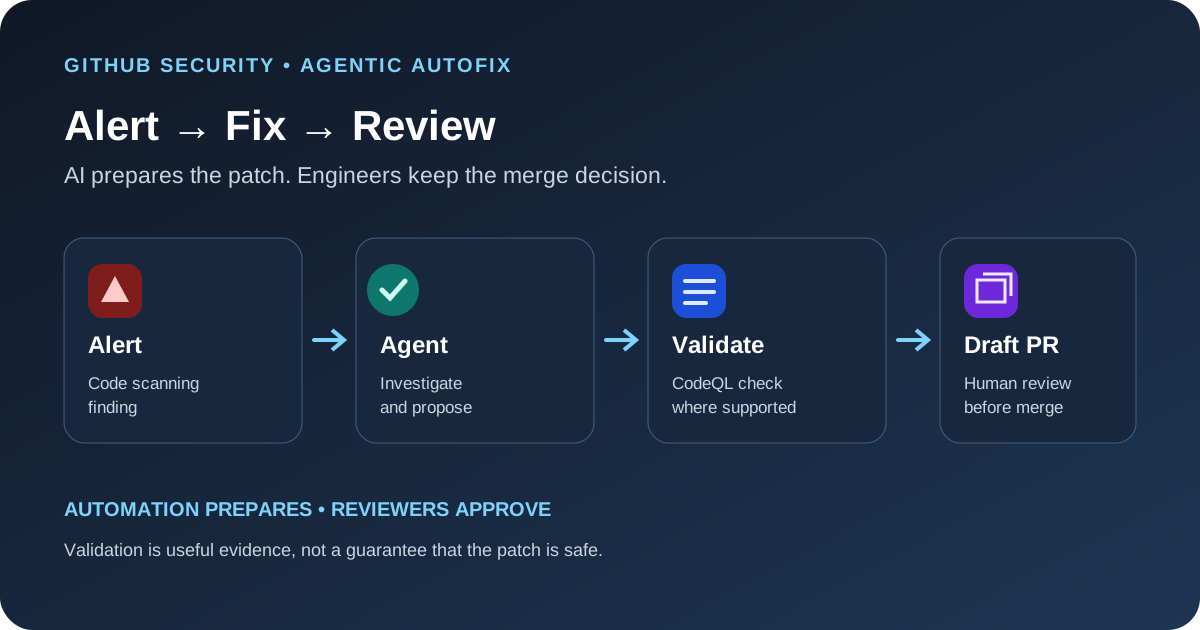
GitHub's Agentic Autofix for code scanning can investigate one or more eligible security alerts, change code across the repository, run validation and open a draft pull request for a developer to review. It reduces the manual work needed to prepare a fix, but the resulting patch still needs normal engineering and security review.
What changed with general availability
Agentic Autofix works from a code scanning alert rather than waiting for a developer to write a patch from scratch. A developer or security team assigns an alert to Copilot. The agent explores relevant code, proposes changes, and validates the result by rerunning the applicable CodeQL analysis. If it can prepare a fix, it opens a draft pull request with the changes for review.
The important output is a reviewable pull request, not an automatic merge. Teams keep their existing branch protections, code-owner review, tests and release process. The feature can help a security backlog move faster, but it does not remove the need to decide whether the proposed change is correct for the application.
Agentic Autofix and Copilot Autofix are different
GitHub documents two related but different experiences. Copilot Autofix offers a suggested code change for an individual supported alert. Agentic Autofix is designed to investigate and fix one or more alerts end to end, then prepare a draft pull request. The distinction matters when a team chooses whether it wants a suggestion to apply manually or a larger remediation task to review.
| Workflow | What it produces | Best fit |
|---|---|---|
| Copilot Autofix | A suggested code change for one alert | A developer wants to inspect and apply a focused fix |
| Agentic Autofix | An investigation and a draft pull request with proposed changes | A team wants the agent to prepare a fuller remediation for review |
Both use AI to help generate potential changes, so neither output should be treated as proof that a vulnerability is fully resolved. Review the diff and test the affected behavior before merging.
Who can enable it and what it costs
Availability depends on repository ownership and the security products enabled for the account. GitHub's documentation lists eligible public repositories on GitHub.com and organization-owned repositories with GitHub Code Security or GitHub Advanced Security. For organization-owned repositories, an organization owner or security manager must enable the feature; enterprise-level policy may also need to allow it. Repositories in an enterprise using Enterprise Managed Users have additional restrictions.
A Copilot license is not required for an eligible public repository owned by a personal account. Agentic Autofix sessions consume Code Security AI Credits and GitHub Actions minutes, however, so teams should check billing and budget controls before enabling it across a large backlog. A general-availability label does not mean every private repository or every plan has identical access.
Run a small pilot before assigning a large backlog
- Choose a low-risk repository. Start with a service that has reliable tests, a clear owner and a manageable alert backlog. Do not begin with a production-critical repository that has no repeatable validation process.
- Review the alert first. Confirm that the alert is relevant, understand the vulnerable path and check whether the finding has already been fixed or accepted through a documented exception.
- Assign a narrow set. Use a small number of alerts so reviewers can compare the agent's proposed changes with the original finding. Avoid broad assignments until the team understands the output and credit usage.
- Inspect the entire pull request. Read every changed file, including tests, configuration and dependency updates. Check whether the patch changes behavior beyond the reported vulnerability.
- Run the normal test suite. Use unit, integration, regression and security tests that match the affected code. A successful security scan is only one signal in the review.
- Track outcomes. Record how many proposed fixes were accepted, revised or rejected, the time required for review, and the Code Security AI Credits and Actions minutes used.
What the validation can and cannot prove
GitHub says Agentic Autofix validates changes by rerunning CodeQL with the code scanning query suite. That is useful evidence that the targeted alert may have been addressed. GitHub also documents limits: it cannot confirm fixes for alerts from custom CodeQL queries, the security-extended CodeQL query suite, or third-party scanning tools. The agent's work is best effort, and the supported validation path depends on the alert source.
A cleared alert does not automatically prove that the patch is free from regressions, that a business rule still holds, or that related vulnerabilities are absent. CodeQL can only check the cases covered by its analysis. The application's tests, code review and runtime monitoring still matter.
Keep a human review boundary
Give the pilot a clear owner and a short acceptance checklist. Review whether the patch fixes the root cause, whether it introduces a new dependency, whether the change follows project conventions, and whether the proposed test actually covers the exploit path. Require the same approvals as any other security-sensitive change.
For teams using multiple AI coding tools, the permissions exposed to those agents also need review. Our MCP server permission checklist explains how to inspect tool access before an agent can reach services or files. The GitHub Copilot code review API guide covers a separate way to bring review into a development workflow.