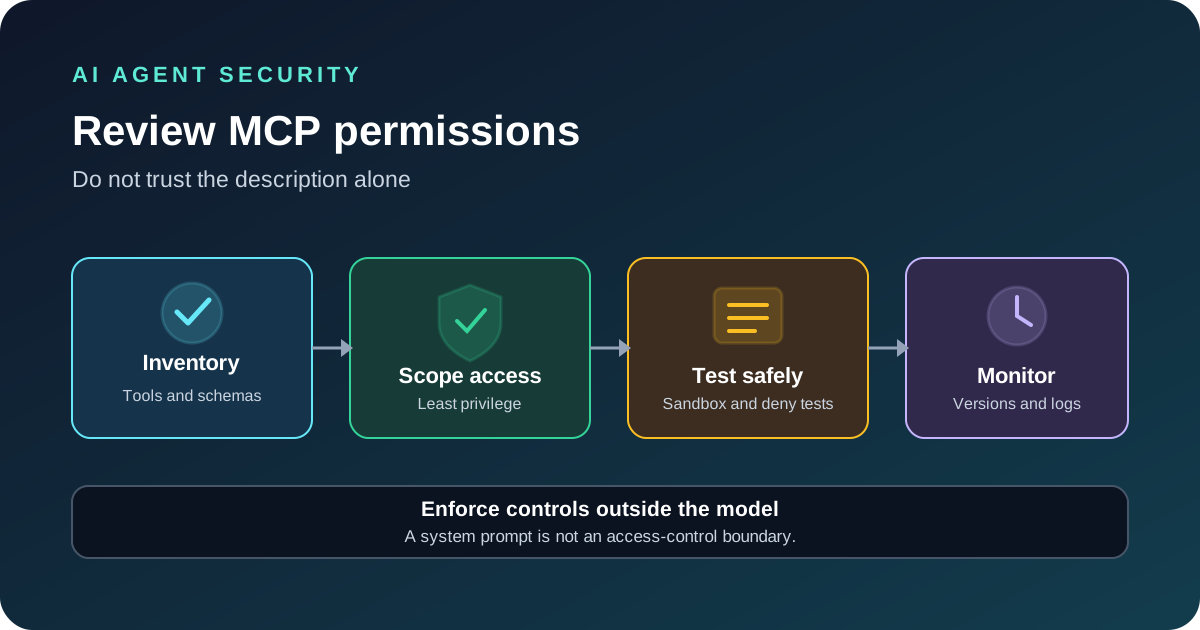
Before connecting an MCP server to an AI agent, review every tool it exposes, the permissions behind those tools, the credentials it uses and the systems it can reach. Do not approve a server only because its name or description looks familiar. An agent can make mistakes, and a compromised or misleading tool can turn an ordinary request into an unsafe action unless the server and its environment enforce clear limits.
Start with the server’s source and purpose
Record the repository or publisher, package name, exact version, installation method, maintainer and reason the server is needed. Review its source and release notes when available, check dependencies and look for recent security fixes. Pin a known version for production rather than allowing an unattended update to change the tool set without review.
Also identify the transport. A local STDIO server usually runs as the operating-system user that starts it and may inherit environment variables and filesystem access. A remote HTTP server needs a clear authentication and authorization design. These paths have different controls; do not apply a single checklist without considering how the server runs.
Inventory every tool before approving the server
List each tool name, description, input schema, return shape and possible side effect. Do not stop at the description field. A tool’s parameter types and return values can influence how an agent interprets its abilities, and the server may expose more access than the task requires.
| Question | Safer design | Warning sign |
|---|---|---|
| What can it read? | Named folders, projects or records only | Access to the entire filesystem or every customer |
| What can it change? | Separate read and write operations with narrow scope | One general-purpose tool that can read, delete and modify anything |
| Which credentials does it use? | Dedicated credentials with only the required scopes | A shared administrator token reused across tools |
| Can it reach the network? | Allowlisted destinations and documented data flows | Unrestricted outbound access with no clear business need |
| Can the tool definition change? | Review and record schema changes before approval | Silent changes to descriptions, parameters or returned data |
OWASP’s MCP security guidance recommends least privilege, scoped credentials, inspection of tool schemas, sandboxing, input and output validation, and human approval for sensitive actions. Treat these as server-side controls, not as instructions that the model can simply be asked to follow.
Apply least privilege to tools and credentials
Give each server only the permissions needed for its task. Prefer read-only access when the agent only needs to search or summarize. If a workflow must write data, separate that capability from read access where practical and require an explicit approval step for deletion, payments, account changes or other high-impact operations.
Use dedicated credentials for each server and user. Limit scopes, shorten token lifetimes where possible and keep secrets out of prompts, logs and tool results. Do not pass a token issued for one service through an MCP server to another service. For remote HTTP deployments, follow the current MCP authorization specification, validate token audience and redirect URIs, use HTTPS and protect token storage.
For a local server, restrict filesystem paths, environment variables, process execution and network access. A system prompt that says “do not open private files” is not a security boundary if the process can read every file on the machine. Enforce the boundary in the operating system, container or server code.
Test in an isolated environment first
Use a test account and non-sensitive data. Start with a minimal set of tools and check both allowed and denied behavior. The server should reject unauthorized requests even when an agent asks confidently, the input contains unexpected values or a tool description tries to persuade the model to ignore its rules.
- Try to read a path outside the approved directory.
- Try a write operation with a read-only credential.
- Send missing fields, wrong types, oversized inputs and invalid identifiers.
- Confirm that one user cannot access another user’s records.
- Test a network destination that is not on the allowlist.
- Stop the server or make its upstream API unavailable and check the failure response.
- Confirm that destructive actions pause for the required human approval.
Review tool descriptions and returned content for instructions that attempt to override the user’s goal, reveal secrets or call another tool. Retrieved content is data, not authority. Validate the requested action in trusted code before executing it.
Track tool-definition changes and monitor use
Record the reviewed tool names and schemas. A hash of the tool definitions can help detect metadata changes and trigger another review. It does not prove that the server’s code or behavior is unchanged, so continue to verify package versions, source and runtime permissions.
Log the server and tool name, version, caller identity, outcome, approval decision and request ID. Avoid recording access tokens, full private documents or unnecessary personal data. Set alerts for unusual failures, unexpected write operations and access outside normal patterns. Revisit the review when the server version, permissions, connected service or business workflow changes.
For high-impact actions, pair this permission review with our AI agent approval policy template and agent evaluation workflow.
Create a simple permission map
Before a server is approved, write down the actions it can take and the data each action can reach. This turns a broad question such as “Is this server safe?” into a list that can be reviewed and tested. Give each tool a clear owner and purpose, and remove tools that are not needed for the current workflow.
| Tool capability | Safer starting point | Extra review needed |
|---|---|---|
| Search or read files | Limit access to a named project or folder | When the task needs private or unrelated files |
| Edit files | Use a draft workspace or controlled repository | Before publishing or overwriting important work |
| Read a database | Use read-only access to required records | When exporting sensitive or large datasets |
| Change a system | Expose only the specific operation the task needs | Before changing settings, access or production resources |
| Send or publish content | Prepare a draft or preview first | Before a message reaches customers or the public |
Separate read operations from write operations when they have different risks. Prefer specific tools with clear parameters over one general tool that can perform many unrelated actions. If a workflow rarely needs a powerful capability, keep it separate and enable it only for that task. The aim is to make the allowed behavior easy to explain and easy to verify.
Keep approval rules clear
Decide in advance which actions an agent may complete on its own and which actions need a person to approve them. Reading a public document may be low risk. Publishing a post, deleting records, changing access or sending a customer message may need confirmation. The exact line depends on the business and the impact of a mistake.
Show the reviewer a plain summary of the proposed action, the target, the data that will change and the expected result. Ask for approval again if the target or action changes after review. Keep a record of the decision so the team can understand why an action was allowed. Do not treat a broad instruction to “manage this project” as approval for every possible change.
These checks should be enforced by the application and the server, not only by a prompt. The model can help explain a proposed action, but the trusted code must decide whether the action is permitted. A server should still reject a request that falls outside its allowed scope, even if the agent believes it is useful.
Test normal and denied behavior before rollout
Start with a test environment and non-sensitive sample data. Check that normal requests work, that invalid input receives a clear error, and that the server denies actions outside the approved scope. Also test what happens when the server or a connected service is unavailable. The agent should not report that an action succeeded when the tool returned an error or an uncertain result.
- Confirm that only the reviewed tools appear when the server starts.
- Check that each tool rejects missing or incorrectly typed fields.
- Verify that a read-only workflow cannot make changes.
- Confirm that actions outside the approved project or dataset are denied.
- Check that sensitive actions pause for the required review.
- Test timeouts, service errors and restart behavior.
- Review a tool-definition change before the updated server is used.
Save the results with the server version and permission map. When a test fails, correct the rule or server behavior and run the test again. Do not assume that a good demonstration with one simple request proves the integration is ready for real work.
Monitor use and review changes
Keep a useful record of the server name, version, tool called, caller, time, result and approval decision. Avoid storing full private documents or other sensitive information unless the workflow has a clear need and a retention policy. Limit who can view the logs, and set a schedule for deleting records that are no longer needed.
Review unusual failures, unexpected write activity, large changes in tool use and updates to the server or its tool definitions. A definition hash can help show that the reviewed description or schema has changed, but it does not prove that the program behind the server behaves the same way. Continue to review the source, version and runtime limits.
If a server changes in an unexpected way, pause the integration and compare it with the approved version. Restore the last trusted release if needed, review recent activity and repeat the permission tests before turning it back on. Keep the response process simple enough that the team can follow it during an incident.
Final readiness checklist
- The server source, version and owner are recorded.
- Every tool has a clear purpose and a narrow set of allowed actions.
- Read and write operations are separated where practical.
- The server can reach only the data and systems required for the task.
- Important actions have a clear approval step.
- Inputs and outputs are checked by trusted code.
- Logs record decisions without collecting unnecessary sensitive data.
- Normal behavior, denied behavior and failure handling have been tested.
- Changes to the server or its tool definitions trigger a review.
For a wider view of how to test agent behavior across complete tasks, read our AI agent evaluation workflow. Permission checks and task-quality tests solve different problems, so use both before a production rollout.
Questions developers ask
Does MCP automatically make a tool safe?
No. MCP standardizes communication, but the server still needs proper authentication, authorization, validation and execution limits.
Should I hash an MCP tool schema?
A recorded hash can help detect changes to the reviewed tool definition. It does not detect every change in server code or behavior, so use it as one control among several.
Do local STDIO servers need OAuth?
The MCP authorization specification treats STDIO differently from HTTP-based transports. Local servers usually rely on the local process identity and environment, so restrict those permissions and protect any credentials they inherit.
Sources
- OWASP: MCP Security Cheat Sheet.
- Model Context Protocol: Authorization specification.
- Anthropic: Model Context Protocol documentation.