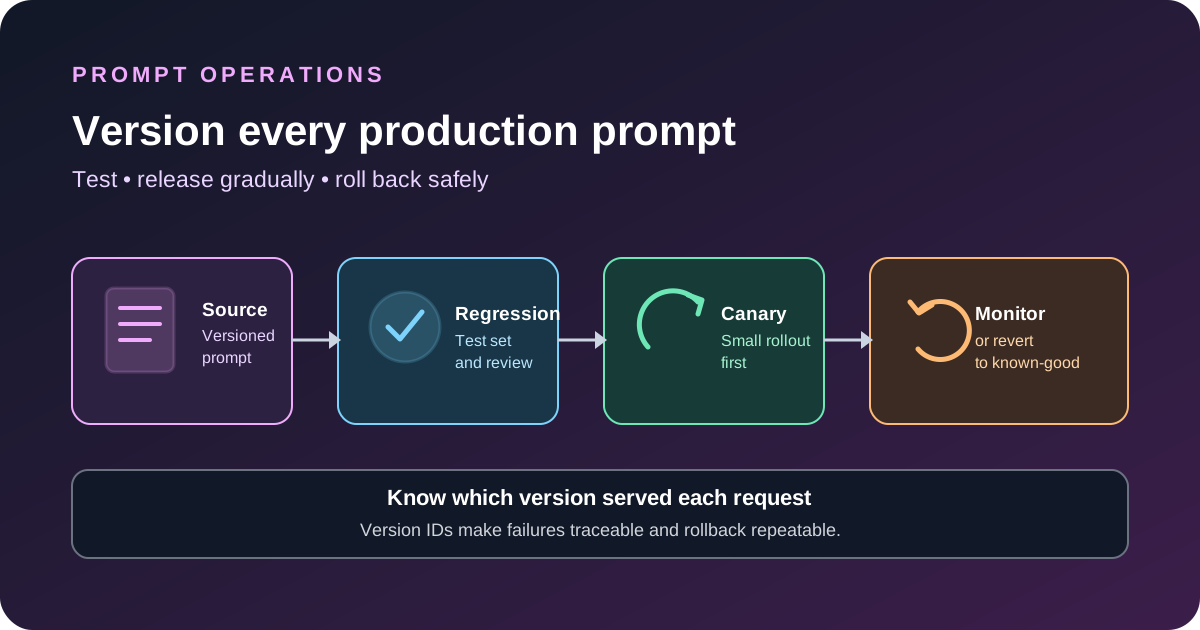
Version production AI prompts in source control, test each change against representative examples, release it in stages and keep a clear path back to the last known-good version. A prompt can change an application’s behavior as much as a code change, so editing it directly in production without a record makes regressions hard to explain and harder to reverse.
Store prompts as application code
Keep the production prompt in a named, version-controlled file or module. Separate stable instructions from task-specific input, and pass dynamic values through validated fields rather than building a large string from untrusted text. Keep the prompt’s expected output shape and the tools it may call alongside the version that uses them.
A small project structure might look like this:
prompts/
  support-reply.v1.md
  support-reply.v2.md
tests/
  support-reply-cases.json
  support-reply-evaluation.md
releases/
  prompt-release-notes.md
The exact structure does not matter as much as being able to answer three questions: which prompt version handled this request, what changed between versions, and how can the previous version be restored?
Define a version contract
For each prompt release, record the prompt identifier or commit, model and version, generation settings, tool definitions, output schema, test-set version and release date. If a prompt relies on a retrieval system or external instructions, record the configuration that affects its behavior as well. Otherwise a later replay may not reproduce the original conditions.
| Item | What to record | Why it matters |
|---|---|---|
| Prompt | Immutable version, file path or commit hash | Lets you recover the exact instruction set. |
| Model | Provider, model ID and snapshot when available | Separates prompt changes from model changes. |
| Inputs | Representative fixtures and redacted examples | Makes regression tests repeatable. |
| Output contract | Schema, required fields and business rules | Shows whether the prompt still fits downstream code. |
| Release | Owner, reason, rollout scope and rollback target | Gives the team a clear response when quality falls. |
Do not overwrite the only copy of a working prompt. Use immutable releases or source-control history so a rollback restores a known version instead of relying on someone to remember the previous wording.
Build a test set before changing the prompt
Collect examples that reflect real work: common requests, edge cases, incomplete input, ambiguous wording, refusals, untrusted text and cases that must not trigger a tool. Keep the expected behavior clear enough for a person or evaluator to judge. A set of polished happy-path examples is not enough to reveal a change that breaks rare but important cases.
Run the same tests against the current prompt and the candidate version. Check task correctness, format compliance, unsupported claims, tool selection, policy violations and the amount of human correction needed. Use deterministic assertions for exact requirements, such as valid JSON or a required field, and human review or calibrated graders for quality that cannot be captured by a simple match.
Do not set a universal pass threshold without looking at risk. A customer-support rewrite and a workflow that changes billing records do not have the same failure cost. For more on repeatable tests, see our AI agent software testing workflow and LLM JSON validation guide.
Release in stages instead of switching everyone at once
Where your system supports it, start with an internal test environment, then a small canary group or limited percentage of traffic. Compare the candidate with the current prompt using the same task types. Expand only when quality and operational metrics remain within agreed limits.
- Keep the old prompt available while the new version is tested.
- Use a feature flag or routing setting to control which version receives traffic.
- Tag logs and metrics with the prompt version and model ID.
- Watch task success, refusal rate, format errors, human edits, latency and cost.
- Define a stop condition before rollout, such as a critical safety failure or a sustained drop in task success.
Aggregate scores can hide a problem in one task type. Break results down by the request categories and users that matter to the product, while avoiding unnecessary collection of personal or sensitive data.
Make rollback a tested operation
Write down the rollback steps before release. In a source-controlled system, this may mean changing a configuration pointer to the previous prompt commit or reverting the release. In a hosted prompt service, it may mean selecting a prior published version. Test the procedure in a non-production environment so you know it restores the prompt, model settings and related schema together.
After rollback, verify that requests are routed to the expected version and that the service has not cached the broken configuration. Keep a short incident record explaining the symptom, affected version, evidence, rollback time and follow-up test. Do not delete the failed version; it is useful for diagnosis and for preventing the same regression later.
OpenAI API users should review the prompt migration timeline
OpenAI’s current prompting guide says reusable prompt objects in the API are being deprecated. Prompt creation was de-emphasized beginning June 3, 2026, and the v1/prompts API is scheduled to shut down on November 30, 2026. The guide recommends code-managed, versioned prompt helpers for new work, with tests, representative fixtures and evaluation checks in the deployment process.
If your application depends on prompt IDs, review the official migration guidance and plan the move before the shutdown date. Do not wait until the final week to discover that a prompt reference is embedded in several services.
Keep release notes useful
For every prompt release, write a short note that says what changed, which failure or task it targets, what tests ran and what would trigger rollback. This helps reviewers focus on behavior rather than wordsmithing alone. It also gives future maintainers a record of why a prompt became shorter, more strict or more explicit.
For the related model-level side of change control, read our AI model evaluation guide. Model changes and prompt changes can interact, so test them separately when possible before combining them in one release.
Keep a release record beside each prompt
A prompt file explains what the model should do, but a release record explains how the application used it. Keep a small record beside the prompt in source control. Include a stable prompt version, the model identifier, the output schema, the test-set revision, the release date and the last known-good version. If the prompt depends on tools or retrieval, record the versions of those parts too.
The record should let another engineer answer three questions without guessing: which configuration handled the request, what changed in the release, and how to restore the earlier behavior. Keep the record simple enough that the team updates it every time. A detailed process that nobody follows is less useful than a short one that stays accurate.
Separate prompt changes from model and tool changes
When possible, change one major behavior source at a time. If the prompt, model, tool schema and retrieval settings all change in the same release, a quality regression becomes harder to explain. First test the new prompt against the current model and tools. Then test the new model against the current prompt. After each part is understood, test the combined configuration.
This separation also makes recovery safer. A prompt may expect a field that an older model or tool does not return. Restoring the old prompt alone will not fix an incompatible output format. Record the dependencies between prompt versions, model settings and tool contracts, and restore a compatible set of changes together.
Match the review to the effect of a mistake
Not every prompt needs the same level of review. A prompt that drafts an internal summary may use a lightweight review and a small regression set. A prompt that sends a customer-facing answer or triggers an important tool call needs stricter tests and a clear approval path.
| Use case | Suggested review | What to watch |
|---|---|---|
| Internal draft or summary | Versioned change, representative tests and owner review | Format errors and usefulness |
| Customer-facing answer | Regression set, human spot checks and limited rollout | Correctness, tone and user corrections |
| Workflow with external actions | Formal approval, negative tests and staged rollout | Incorrect actions and policy failures |
Choose the review level based on the effect of a wrong answer, not on the length of the prompt. A one-sentence instruction can control an important tool call. A longer prompt that only drafts text may have lower operational risk. Define the stop conditions before rollout so the team knows when to pause rather than debating the threshold during an incident.
Document a recovery procedure
Write down how the service returns to the previous known-good version. The procedure should identify where the active version is selected, who can change it, how the application refreshes its configuration and how to confirm that the old version is serving requests again.
When a problem appears, stop expanding the rollout, use the request logs to identify the prompt and model versions involved, restore the compatible configuration and run the key regression cases. Send a small controlled request to confirm that the service is using the intended version. Then record the cause, affected version, evidence and a test that would catch the issue next time.
Keep this procedure where the person responsible for the service can find it. Test it in a non-production environment after major changes to prompt routing or release controls. A process that depends on the original author being available is not a dependable process.
Keep evaluation examples useful and safe to share
Evaluation sets often use real examples because they reveal how people phrase requests. Before storing examples in a shared repository, remove personal details or replace them with synthetic cases that preserve the behavior being tested. Limit access to private evaluation data and decide how long it needs to be kept.
When a failure needs deeper review, save the minimum evidence needed to reproduce it. A redacted input, prompt version, model identifier, tool-result summary and evaluation outcome can be more useful than a full conversation dump. Apply the same privacy rules to test fixtures and logs that you apply to the application itself.
Measure the effect after release
Offline tests show how a prompt behaves on known examples, but real requests can still reveal patterns the test set missed. Compare the new release with the previous one using the same task categories. Track completion rate, output validation errors, human edits, user corrections, latency and cost. Review a sample of responses rather than relying only on a single aggregate score.
Keep the prompt version attached to the metrics so the team can tell whether a change helped or made one task type worse. If quality drops, pause the rollout and inspect the examples that changed. Add a representative case to the evaluation set after the cause is understood. This turns a one-time incident into a repeatable test and makes future releases safer.
Questions developers ask
Should every prompt edit get a new version?
For production prompts, keep a traceable version for every change that can affect behavior. Tiny wording edits can change tool use, refusals or output format, so record them and run the relevant tests.
Can I roll back only the prompt?
Sometimes, but first check whether the prompt is tied to a new model, tool schema or output contract. Roll back the compatible set of changes together.
How often should I run prompt evaluations?
Run them before every release that changes behavior, then monitor real outcomes after rollout. Repeat the tests when the model, tools, retrieval setup or output contract changes.
Sources
- OpenAI API: Prompting and code-managed prompts.
- OpenAI API: Deprecations and migration dates.
- Anthropic: Prompting best practices.