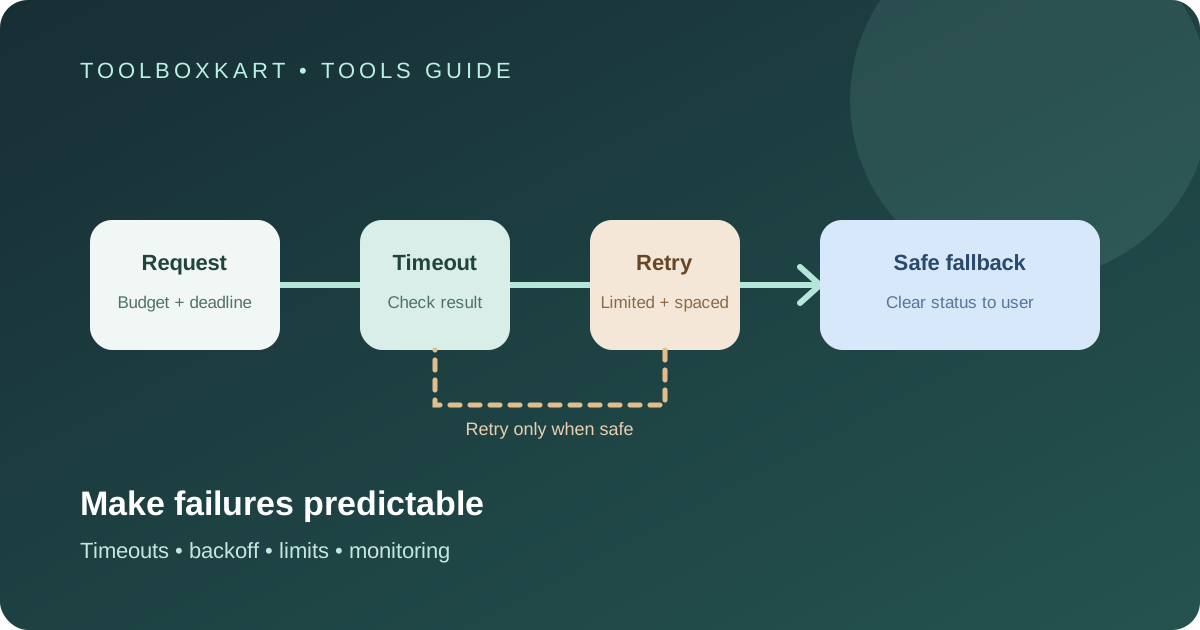
A reliable AI application should treat model API failures as a normal operating condition, not an unexpected exception. The safest pattern is to set a request deadline, retry only errors that may recover, use bounded exponential backoff with jitter, and return a clear fallback when the budget is exhausted. Do not blindly repeat every failed request: retries can increase cost, duplicate side effects and make a busy service even less stable.
Start by classifying failures
Before adding retry logic, separate temporary failures from errors that need a code or configuration change. Common temporary cases include a network timeout, a rate-limit response or a provider service error. Common permanent cases include invalid request fields, an unsupported model name, missing permissions or an expired credential.
| Failure | Typical response | Why |
|---|---|---|
| Rate limit or temporary overload | Wait, then retry within a cap | The provider may accept the request later. |
| Network timeout | Check request state, then retry if safe | The provider may have received the request even if the client missed the response. |
| Provider service error | Use bounded retry and monitor the error rate | A short outage may recover. |
| Invalid input or unsupported model | Return a clear error and fix the request | Repeating the same request will not fix it. |
| Authentication or permission error | Stop and alert the owner | Automatic retries can hide a broken configuration. |
Use each provider's current API documentation to map exact status codes and retry guidance. The table above is a starting point, not a replacement for provider-specific rules.
Set a total deadline, not just a timeout per request
A request timeout limits how long one attempt can wait. A total deadline limits how long the user or upstream job should wait for the whole operation, including retries. Set both. If an application allows three 30-second attempts with long delays, one user request can take far longer than expected.
Choose a total deadline that matches the task. An autocomplete suggestion needs a short limit and a quick fallback. A background report can wait longer, but it should expose progress and stop at a defined budget. Propagate the deadline through retrieval, tool calls and model requests instead of giving every step a fresh full timeout.
Use bounded exponential backoff with jitter
When a retry is appropriate, increase the wait after each failed attempt and add a small random delay. This is called exponential backoff with jitter. It reduces the chance that many clients will retry at exactly the same time after a shared outage.
Set a maximum attempt count, a maximum delay and a total elapsed-time limit. Respect a provider's retry-after guidance when it is present. Do not retry immediately in a tight loop. Also cap retries at the workflow level: an agent that calls a tool, which calls another service, should not multiply retries across every layer without a shared budget.
Do not repeat actions that may have side effects
A timeout does not always mean the provider failed to process the request. It may have completed the work but the response was lost. For a simple text generation request, a retry may create a second response and additional charges. For a workflow that sends an email, publishes a post or changes a record, a retry can repeat the action.
Use idempotency keys where the API supports them. Otherwise, record a request identifier and check whether the operation completed before repeating it. Keep model generation separate from external actions when possible: generate a proposed action, validate it, then perform the side effect once through a controlled tool.
Design a useful fallback
A fallback does not always mean switching to another model. Pick the response that best protects the user and the data:
- Return a clear temporary status when the task cannot be completed safely.
- Use a cached result only when it is still valid and the interface shows its age.
- Switch to a second provider only when the fallback model supports the needed features and the data-sharing rules allow it.
- Use a simpler deterministic path for tasks that can be completed without a model.
- Ask for a human review when the result affects a customer, money, access or an external system.
Provider fallback requires more than changing a model string. Check the output schema, tool definitions, context limits, data retention, supported regions and pricing. A second provider may handle the same prompt differently or receive data under different terms.
Validate the response before using it
Even a successful HTTP response can contain incomplete or unusable output. Validate required fields, parse structured data, check allowed values and handle refusals or empty responses. If the result fails validation, decide whether one controlled repair attempt is reasonable or whether the task should stop for review.
Never send an invalid model response directly to a database update, deployment command or customer-facing action. Use schema validation and explicit permission checks at the application layer.
Track the right metrics
Log the provider, model identifier, request ID, attempt count, response status, latency, token usage and final outcome. Avoid storing raw prompts or personal data unless you have a clear reason and the right controls. Review:
- success rate after retries;
- p50 and p95 end-to-end latency;
- cost per successful task, including failed attempts;
- fallback frequency and whether the fallback completed the task;
- errors by provider, model and workflow;
- duplicate actions or validation failures.
These measures help you distinguish a provider issue from a prompt problem, a local timeout or a broken integration. Pair this guide with our LLM API cost-per-task guide so retry overhead appears in your budget rather than hiding in a request count.
A rollout checklist
- Define a total deadline and per-attempt timeout for each workflow.
- Classify retryable and non-retryable errors using current provider documentation.
- Add bounded backoff, jitter and a shared retry budget.
- Protect side effects with idempotency or a completion check.
- Validate the output before it reaches tools or external systems.
- Test a timeout, a rate limit, a provider outage and a malformed response.
- Measure latency, cost and success rates in a staged rollout before expanding traffic.
Frequently asked questions
Should every AI API error be retried?
No. Retry only errors that may recover. Invalid requests, missing permissions and broken credentials need correction, not repeated attempts.
Is switching to another model always a good fallback?
No. Confirm that the alternate model supports the needed features and that your data-sharing, privacy, output and cost requirements still hold.
How many retries should an AI app allow?
There is no universal number. Choose a small cap based on the task deadline, provider guidance and cost budget, then test it under failure conditions.