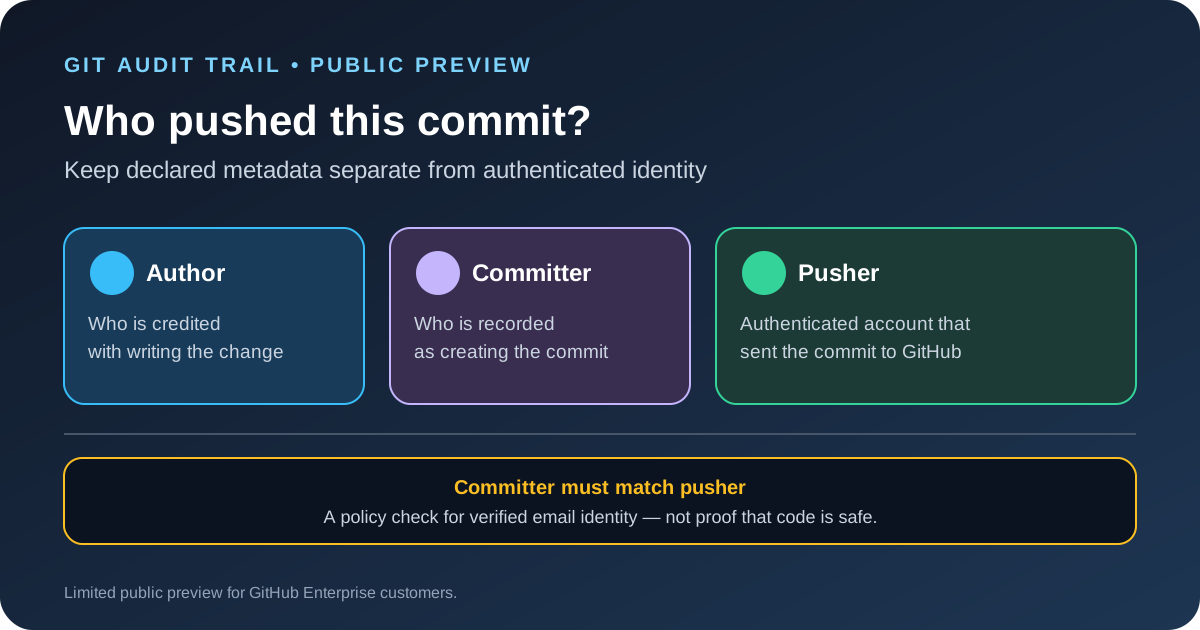
GitHub announced a limited public preview of push attribution on October 12, 2026. The feature records the authenticated user who pushed a commit and shows that identity in the UI and API alongside the existing author and committer fields. GitHub is also adding a repository rule condition called Committer must match pusher, which can block pushes when the committer metadata does not match a verified email address belonging to the authenticated pusher.
The change addresses a gap in commit auditing: author and committer names and email addresses are supplied by the client, while the pusher is the account GitHub authenticated when the commit was sent. The new field adds a separate signal for investigations and policy enforcement. It does not prove that the code is safe or that the commit received a review.
Author, committer and pusher answer different questions
The author field identifies the person credited with writing the change. The committer field identifies the person or process recorded as creating the commit object. Git allows those fields to contain names and email addresses supplied by the client, so the strings alone are not proof that the named person pushed the change.
The pusher is the authenticated user who sent the commit to GitHub. GitHub already authenticates pushes; the preview adds durable per-commit attribution and makes that identity visible alongside the other metadata. During an investigation, that helps an administrator distinguish the identity claimed by a commit from the account that delivered it to the repository.
For example, a compromised account with write access might push a commit that uses a trusted maintainer's name and email in the author or committer fields. The code can then look as if it came from the maintainer even though another account performed the push. Pusher attribution gives reviewers a separate identity to check. It does not replace access controls, code review or signed-commit policies.
What the new ruleset condition checks
The new Committer must match pusher condition blocks a push when the committer metadata does not match any verified email address of the authenticated pusher. Teams can add the condition to a ruleset to enforce a stricter relationship between the commit's committer field and the account delivering it.
That is narrower than saying every identity field is now verified. GitHub's announcement describes the rule in terms of the committer field and the pusher's verified email addresses. Do not assume it validates the author field, proves that the patch was reviewed or confirms that the commit contents are trustworthy.
The feature is currently a limited public preview for GitHub Enterprise customers. GitHub directs interested customers to contact their account team to request access. It is not announced as generally available for every GitHub plan, and the announcement says the release is not supported on GitHub Enterprise Server.
How to test the rule without disrupting development
- Confirm preview access. Check with your GitHub Enterprise account team and verify that the repository has the required feature available before designing a rollout.
- Inventory push identities. List the people, bots, deployment keys and service accounts that can push to the repository. Confirm which verified email addresses each account uses.
- Start with a low-risk repository. Add the condition to a narrowly scoped ruleset and test normal developer pushes, rebases, cherry-picks, release automation and bot-generated commits.
- Check legitimate failures. A service that sets a committer email not verified on the account that performs the push may be blocked. Correct the identity configuration rather than bypassing the rule for every workflow.
- Review bypass rights. Keep the ruleset's bypass list small and documented. A control that most users can bypass provides less value during an incident.
- Update the incident process. Teach responders to record author, committer and pusher separately. Use the authenticated pusher identity as one input to the investigation, not as the only test of intent.
- Expand after the pilot. Review blocked pushes, automation exceptions and audit outcomes before applying the condition to more repositories.
Rulesets can control how people interact with branches and tags, but the correct scope depends on the team's workflow. GitHub's rulesets documentation explains the general model. Keep your existing branch protections and review requirements in place while evaluating this preview.
What the new attribution does not settle
Push attribution adds evidence about who delivered a commit, but it does not decide whether the change is malicious, whether a trusted account was compromised or whether the code passed the required tests. A valid pusher can still submit unsafe code, and a legitimate automation account can still have excessive access. Continue to restrict write permissions, review sensitive changes and investigate unusual activity.
The public announcement also does not describe every edge case for shared automation identities or explain every detail of historical commit attribution. Test your own workflow and confirm the current product documentation before using the feature as a compliance control. Do not promise auditors that the preview closes every route to identity spoofing.
Pair commit provenance with code review
Push identity and code analysis solve different problems. Attribution helps answer which authenticated account sent a commit. Code scanning helps identify potential weaknesses in changed code. GitHub's new AI Scan metrics offer a separate view of security findings and remediation activity, while our CodeQL 2.27.2 guide covers changes to GitHub's established analysis engine.
Teams that use coding agents should also keep their tool access narrow. Our MCP permission testing guide explains how to review exposed tools, credentials and denied behavior before connecting an agent to a repository or production service.
Sources
- GitHub Changelog: Push attribution for commits in limited public preview.
- GitHub Docs: About rulesets.