GitHub CLI now offers expiring, automatically refreshing OAuth credentials in public preview. In GitHub CLI v2.103.0, users can opt in with gh auth login --expiring; the CLI refreshes the access token when needed instead of relying on a long-lived token. This can reduce the useful lifetime of a leaked access token, but it can also break scripts that copy a token once and reuse it after expiry.
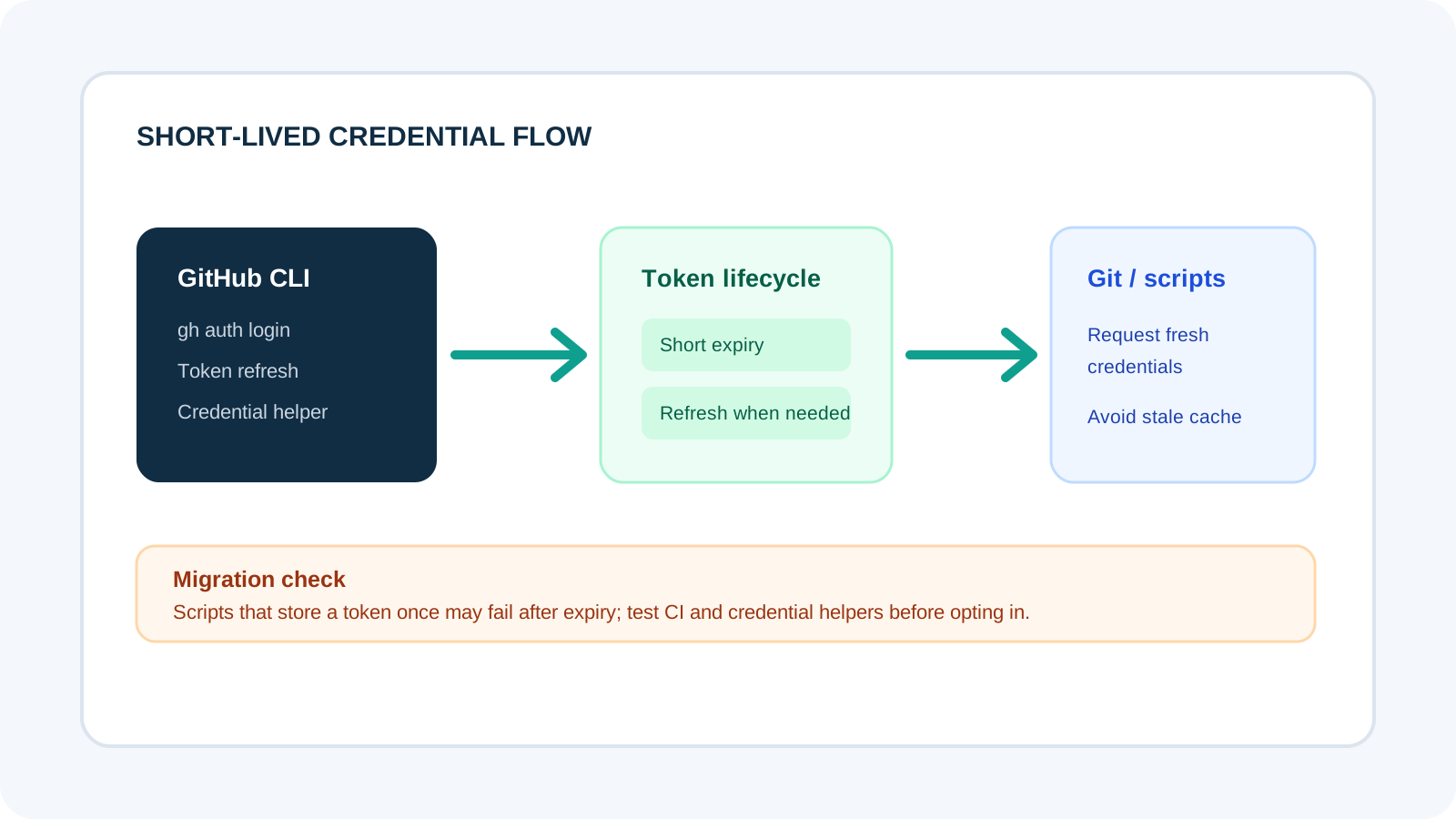
What the preview adds
The feature pairs an expiring access token with a rotating refresh token. It is opt-in, and existing sign-ins keep their current behavior unless the setting is enabled.
Why expiring tokens are different
GitHub's preview changes the lifetime and renewal path of the credential used by the CLI. Instead of relying on a long-lived access token, GitHub CLI can use a short-lived access token together with a rotating refresh token. The CLI renews the access token when it is needed, so users can remain signed in without manually repeating authentication at every expiry.
The security benefit is limited but useful: a copied access token has a shorter window in which it can be reused. It does not make a compromised workstation safe, protect a refresh token stored on a compromised machine, or replace least-privilege permissions. Treat it as one layer in credential hygiene rather than a complete account security solution.
The feature is opt-in and backward compatible. If you do not enable it, existing sign-ins and manually supplied tokens continue to work as before. GitHub says the behavior is available on github.com and ghe.com, while GitHub Enterprise Server support starts with GHES 3.23; earlier versions fall back to non-expiring behavior.
How to opt in safely
GitHub CLI v2.103.0 adds an explicit login flag. To enable the preview for a single sign-in, use:
gh auth login --expiringTo enable the setting for future sign-ins, GitHub documents this configuration command:
gh config set expiring_credentials enabledAfter signing in, check the credential state with gh auth status. If you use Git over HTTPS and want GitHub CLI to manage the credential, GitHub recommends:
gh auth setup-gitStart with a development machine or a low-risk repository. Confirm that your CLI version is current, that the sign-in used the expiring option, and that the credential helper is configured if Git operations depend on it. Do not paste access or refresh tokens into logs, tickets or shell transcripts while testing.
Check Git and automation compatibility
GitHub strongly recommends Git 2.46 or newer when using expiring credentials. Newer Git versions can mark these credentials so they are not cached beyond their lifetime. Older versions may still work, but GitHub says they can print a one-time recommendation to upgrade. Check the Git version on developer machines and build agents, not only on your laptop.
The biggest migration risk is software that captures a token once and stores it for later. A script that runs gh auth token and writes the value into a long-lived environment variable or configuration file can eventually use an expired credential. If an external tool needs a token, fetch it at the time of use rather than persisting the old value. Prefer using GitHub CLI as the Git credential helper for normal HTTPS Git operations so refresh can happen in the expected path.
Before enabling the preview across a team, test clone, fetch, push and any CI job that uses GitHub CLI. Include non-interactive jobs, scheduled workflows, credential caching and scripts that call APIs directly. Keep a rollback plan and document which workflows should wait if they depend on a token remaining valid for a long time.
What can break after the change?
Any workflow that assumes a token stays valid indefinitely deserves attention. Common examples include a script that reads a token once at startup, a local tool that caches credentials for days, or an automation that passes a token to a second process and never refreshes it. A failed push may look like a permissions problem even when the actual issue is an expired cached credential.
Diagnose failures by checking the CLI's authentication state, the Git credential helper configuration and the versions of Git and GitHub CLI. Avoid printing secrets to debug output. If a workflow cannot request fresh credentials when needed, leave that workflow on its current authentication method until it is updated and tested.
Expiring tokens can improve the response to accidental exposure, but they do not replace organization policies, narrow scopes, environment isolation, secret storage or prompt revocation. Teams should continue to use short-lived CI credentials where supported, remove unused access and monitor for unexpected activity.
Rollout checklist
- Upgrade GitHub CLI to v2.103.0 or newer.
- Check Git version and use 2.46 or newer where possible.
- Test
gh auth status, HTTPS Git and the credential helper. - Find scripts that persist the output of
gh auth token. - Test automation without logging token values.
- Enable the preview only after the affected workflows pass.
Public preview means the behavior may change
GitHub describes expiring credentials as a public preview and says it plans to make them the default for new sign-ins in a future release. That plan is not the same as a date or a completed rollout. Administrators should follow the official changelog and CLI documentation for changes to availability, defaults and supported environments.
If your organization uses GitHub Enterprise Server, confirm the server version before enabling the setting. GitHub says GHES 3.23 is the first version that issues expiring tokens; earlier versions fall back to the existing non-expiring behavior. That fallback can make a test appear successful without confirming that token expiry is active, so verify the actual credential state.
A quick troubleshooting sequence
If Git operations begin failing after you enable expiring credentials, start by confirming that the CLI is authenticated and that the credential helper is active. Run gh auth status, check your installed GitHub CLI and Git versions, and verify that Git is using the expected helper. Do not share raw token output while diagnosing the problem.
Next, identify where the failing workflow gets its credential. If it calls GitHub CLI directly, allow the CLI to refresh the token when needed. If it copies a token into another process, environment variable or long-lived cache, change that integration to obtain a fresh value at the time of use. If the tool cannot handle short-lived credentials, keep it on the existing flow until it can be updated.
Test the fix on a non-critical repository before changing a shared runner or team-wide configuration. A clean clone and a successful one-time push are not enough if the real automation runs hours later. Include delayed jobs and scheduled tasks in the test, because those are the cases most likely to reuse a stale token.
Related ToolBoxKart guides
Authentication changes often affect more than the CLI itself. For a broader permissions review, see our guide to testing MCP server permissions before use. If the credential is used inside an agent workflow, the AI agent evaluation workflow can help you test the full system and its side effects.