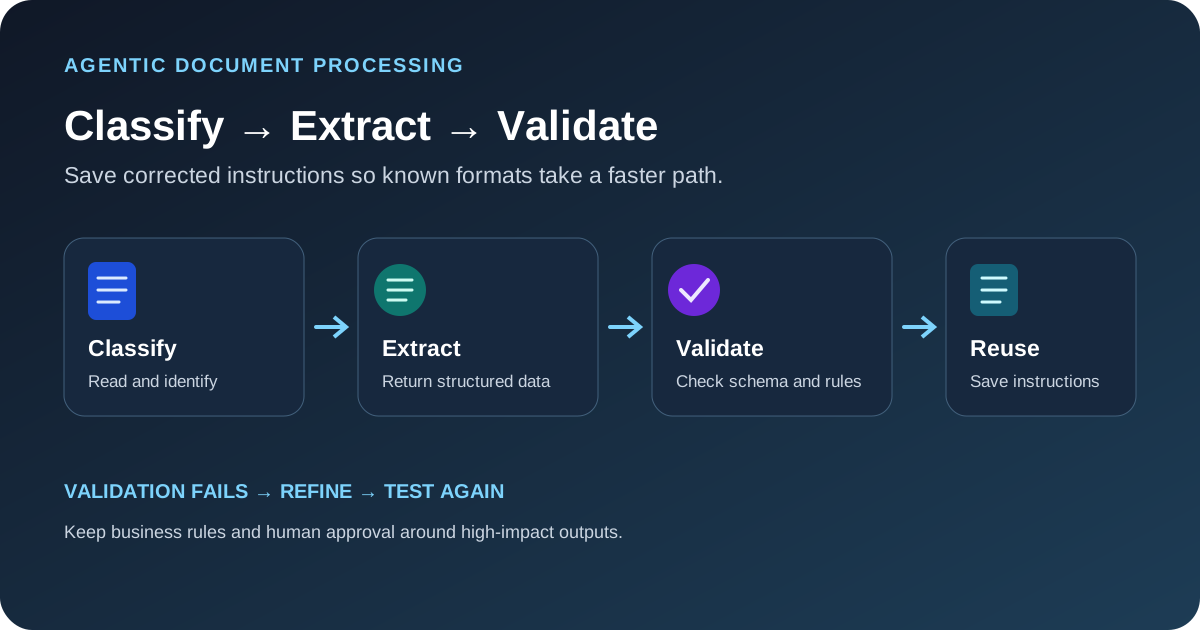
Amazon Bedrock AgentCore can be used to build an agentic intelligent document processing pipeline that classifies files, extracts structured fields, validates them against business rules and saves instructions for later documents of the same type. AWS published a reference implementation on October 14, 2026. This guide explains the workflow and the checks to make before adapting the sample to invoices, purchase orders, claims or other business documents.
How the sample architecture works
The AWS example uses eight specialized agents across two graph-based workflows. The identification workflow reads a document, identifies its type and sender, and searches for similar documents. If a match exists, the automation workflow uses saved extraction instructions. If the format is new, the training workflow creates instructions, extracts fields, validates the result and refines the instructions when validation fails.
The surrounding infrastructure handles intake and orchestration. Documents arrive through Amazon Simple Email Service or direct upload to Amazon S3. EventBridge triggers Lambda, a job record is stored in DynamoDB, and AgentCore Runtime runs the agent workflow. AgentCore Identity and Amazon Cognito support access, while AgentCore Gateway exposes Lambda functions as tools through an MCP interface. Textract reads the document, S3 Vectors supports similarity matching, Aurora DSQL stores validation data, and CloudWatch plus AgentCore Observability help operators inspect runs.
Check the prerequisites before deploying
The reference implementation needs an AWS account, access to Amazon Bedrock with the required Nova and Anthropic models enabled, and a supported Region for AgentCore Runtime, Gateway, Identity, S3 Vectors and Aurora DSQL. AWS lists AWS CDK v2, Docker, Python 3.11 or later, Node.js 18 or later, and IAM permissions to create the required infrastructure as prerequisites.
Use a development account or a dedicated test environment. The sample creates multiple services and cloud resources, so review account quotas, region availability, network rules and estimated cost before deployment. Do not start with real invoices, loan applications or claims that contain sensitive data until your security and privacy controls are approved.
Deploy the reference implementation
The AWS post links to a reference implementation. Open the source article first, follow its repository link, and review the current prerequisites before deploying. The setup process has four parts:
- Obtain the sample repository from the link in the AWS article and review its README and deployment instructions.
- Create and activate a Python virtual environment, then install the dependencies listed by the sample.
- Install the UI dependencies from the orchestrator directory and return to the project root.
- Use the sample's documented deployment script with an administrator email address you control.
The deployment creates six CloudFormation stacks for core resources, gateway tools, the database, the agent runtime, the UI orchestrator and the web interface. AWS estimates the infrastructure deployment at roughly 15–20 minutes. Wait for each stack to reach CREATE_COMPLETE in CloudFormation before using the UI.
The email sent after deployment contains the web URL and temporary sign-in details. Treat those credentials as sensitive, change or rotate them according to the sample's instructions, and do not commit them to source control or share them in screenshots.
Process a first document type
Start with the included synthetic purchase-order sample. In the web UI, choose Process Document and upload a file from the training sample directory. The Analyzer extracts text and identifies the sender and document type. The Matcher searches for a similar document in the vector store. If it cannot find a match, the training workflow begins.
The Instructions agent generates extraction prompts from the schema, and the Extractor returns structured JSON. The Validator checks the result against a schema and business rules. If validation fails, the Instructions Fixer can refine the extraction instructions and retry. Once the result passes, the Save Instructions agent stores the refined instructions so future documents of that type can use them without generating a new prompt from scratch.
AWS's example shows a vendor SKU that does not match the company's internal format. Validation catches the mismatch, the Instructions Fixer adds a transformation rule, and the next attempt passes. The important design pattern is that an error is not silently accepted: a validator produces a specific reason, the workflow corrects the extraction instructions, and the corrected rule is checked again.
Reuse instructions for known formats
When a similar document arrives later, the Matcher can find the saved instructions and route the file to the automation workflow. The Extractor uses the existing instructions, and the Validator checks the extracted fields. If values are wrong, the Troubleshooter can fix the extracted data without changing the stored instructions for every future record.
This separation prevents one bad record from automatically changing the extraction rules for all later records. Keep an audit trail of the source document, model output, validation errors, any correction, the final accepted fields and the version of the instructions used.
Replace the sample schema and business rules
The included implementation is built around a synthetic purchase-order scenario and a mock ERP dataset. Before using it for another document type, create a JSON schema for the fields you need and define which values must be explicitly present versus inferred. Add a validator that checks extracted data against trusted business records, totals, identifiers and required fields.
For an invoice, a validator might compare line-item totals with the invoice total and match the vendor ID against accounts payable records. A contract workflow might check for required clauses and compare dates and party names with an approved record. The correct rules depend on the business process; a model's plausible JSON is not enough. Our LLM JSON validation guide covers schema checks, semantic rules and bounded retries.
Update the agent prompts so they use the vocabulary and requirements of the new document type. Keep model choice, schemas, validation logic and prompt versions under review. When a model changes, run the same evaluation set again and compare extraction accuracy, invalid outputs, latency and cost. The model evaluation workflow provides a repeatable comparison approach.
Security, observability and cost controls
Use least-privilege IAM roles and keep document access separate from infrastructure administration. Restrict who can upload files, inspect extracted data, change schemas and approve new extraction instructions. Review encryption, logging, retention and deletion for each service that stores source documents, intermediate outputs, vectors, job records or extracted fields.
Instrument the workflow so operators can see which agent ran, which tools it called, how many validation attempts occurred, which rule failed and what was finally accepted. Apply content and grounding controls where needed, and route ambiguous or high-impact records to a person. For production use, add idempotency and retry limits so a repeated event does not create duplicate business actions.
AWS estimates roughly $58 per month for a sample workload of 10 training documents and 1,000 processed documents in US East (N. Virginia), with foundation-model inference accounting for about 85% of the estimate. The post reports an approximate model-inference cost of $0.055 per document. These are AWS estimates for the stated workload and Region, not a quote for your use case. Model selection, document size, retries, resource settings and actual usage can change the bill.
Clean up without losing needed data
Before removing the test environment, export any results and instructions you need to retain. AWS warns that its sample cleanup procedure permanently deletes processed documents in S3, job history in DynamoDB, validation data in Aurora DSQL and learned extraction instructions in the vector store. Review the deletion scope, confirm that required records have been retained under your policy, and verify that the related CloudFormation stacks are removed afterward so the test environment does not continue to incur charges.
Before using it with business records
- Test 5–10 representative documents per type, including changed layouts and malformed scans.
- Require schema and business-rule validation before extracted values reach a downstream system.
- Keep the original document and an auditable record of corrections where retention policy permits.
- Limit model and tool permissions; do not let the agent write directly to production systems without an approval and rollback plan.
- Monitor cost per accepted document, validation failure rate, retry count and manual review rate.
- Test deletion, retention and recovery paths before uploading sensitive files.
The useful feature of this pattern is the feedback loop between extraction and validation. It can reduce repeated template setup, but it does not eliminate the need for a good schema, trusted business rules, access controls and checks on the final result.