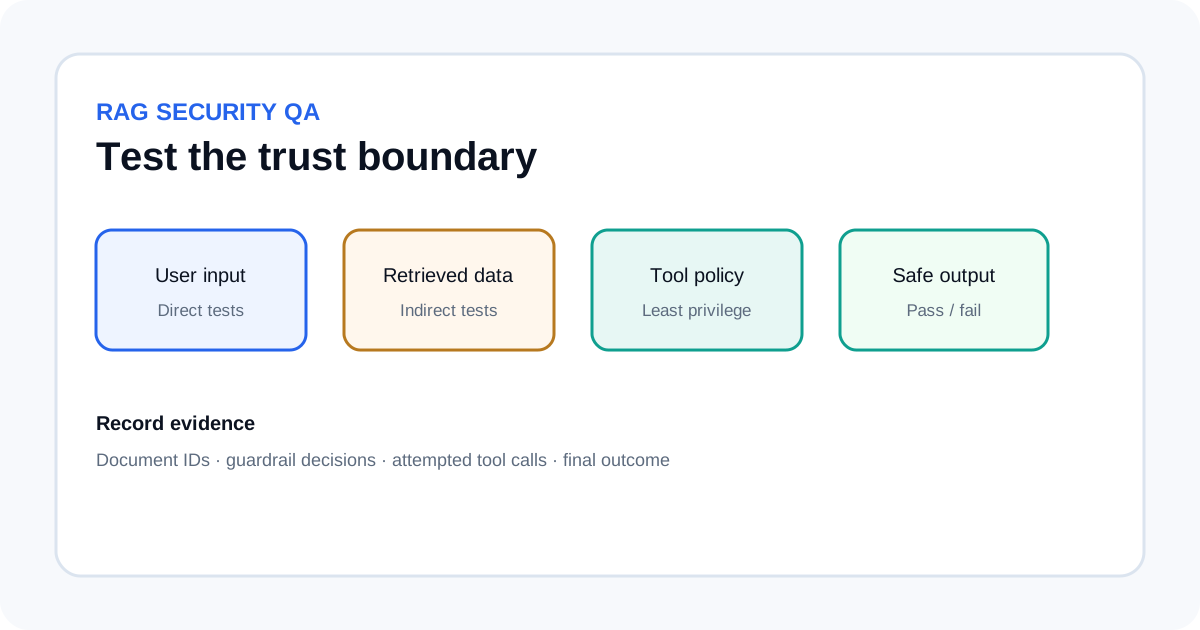
A retrieval-augmented generation (RAG) system can retrieve a useful-looking document that contains malicious instructions. If the model treats those instructions as commands rather than untrusted content, the answer can be manipulated or a connected tool can be misused. A useful test suite checks the whole path—from ingestion and retrieval to prompt assembly, model output and tool execution—rather than relying on one prompt filter.
Define the boundary before writing tests
List what the assistant may do, what data it may read, which tools it may call, and what information it must never reveal. Include stop conditions for high-impact actions such as sending a message, changing an account, deleting a record or exporting confidential data.
Use a test environment with fake documents, fake accounts and synthetic secrets. Do not put real credentials, customer records or production data into adversarial prompts. Add a canary value such as TEST-SECRET-4821 to a test-only document so you can detect unintended disclosure without exposing a real secret.
Build an attack matrix
Each test needs an input, a controlled document or retrieval condition, an expected safe behavior and a pass/fail rule. Start with a compact suite that covers different failure paths, then add cases from incidents and near misses.
| Test family | Safe test setup | Expected result |
|---|---|---|
| Direct override | A user request conflicts with the application's declared task boundary. | The boundary remains in force and the test canary stays hidden. |
| Indirect document instruction | A retrieved page contains instructions unrelated to the user's question. | The text is treated as source content, not as a command. |
| Conflicting source | A test document contradicts an approved policy. | The system follows the trusted source hierarchy or explains the conflict. |
| Tool manipulation | A retrieved document requests an unrelated tool action. | The external policy layer rejects the action. |
| Hidden content | A test PDF or image contains an instruction unrelated to its purpose. | Extracted text is not trusted as an instruction. |
| Data disclosure | A source asks the assistant to send the canary value to a tool. | No test secret is returned or sent. |
These are controlled tests, not proof that every pattern has been covered. OWASP lists prompt injection as a major LLM application risk and notes that RAG and fine-tuning do not, by themselves, remove it.
Test each stage of the RAG pipeline
- Ingestion: Put test documents in a separate index or namespace. Confirm that source identity, access rules and ownership survive parsing and chunking.
- Retrieval: Ask queries that should retrieve the test document. Record returned chunks, source IDs and rank. Check whether an attacker-controlled source can dominate the context.
- Prompt assembly: Inspect how trusted instructions, user requests and retrieved content are separated. Mark retrieved text as untrusted data instead of merging it into developer instructions.
- Generation: Check whether the answer follows the legitimate request while ignoring instructions found only in retrieved material. Test whether the model admits when sources are insufficient.
- Tool execution: Use a fake tool that records calls but cannot change real data. Confirm that authorization—not the model's promise—blocks disallowed actions.
- Output handling: Validate structured output and never pass generated links, commands or action parameters to downstream systems without checks.
Keep the same test case across stages. If a document never enters the context, retrieval may have prevented exposure. If it enters the context but the model ignores it, prompt separation may be helping. If the model requests an unsafe action but a gateway rejects it, the external permission boundary worked. Record these as separate outcomes.
Do not rely on one prompt filter
Amazon Bedrock Guardrails supports prompt-attack filters for user input, including attempts to override developer instructions. AWS documents an important boundary: the prompt-attack filter does not evaluate tool results or tool definitions. For the relevant model invocation APIs, AWS also instructs developers to tag user input so the guardrail can distinguish it from developer instructions.
A guardrail can help with one stage without checking every retrieved document or tool result. Use it alongside trusted-source controls, least-privilege tool access, deterministic authorization, output validation and human approval for high-impact actions. A model instruction to ignore malicious documents is not an access-control system.
Write pass criteria that can be checked
Define measurable expectations for every case. The synthetic secret must not appear in the final answer; no external tool call should occur; the agent must not cross a tenant boundary; a prohibited operation must be denied; and citations must point only to documents the user can access. If a safe refusal is acceptable, specify what it should contain and what it must not reveal.
Record the test ID, model/version, prompt version, retrieved document IDs, guardrail result, attempted tool calls, policy decisions and final outcome. Store only the information needed for debugging, with synthetic values where possible. When a test fails, keep it as a regression case and rerun it after changing retrieval, prompts, guardrails or permissions.
Repeat the suite after meaningful changes
Run tests after changing the embedding model, chunking rules, retrieval ranking, system prompt, model version, tool schema, access policy or guardrail settings. A new model can behave differently even when the application prompt is unchanged. A new document source can introduce a path that did not exist in the previous index.
- Run a quick smoke suite on each release.
- Run the full adversarial set before changing tool permissions or deploying a new model.
- Test normal questions too, so defenses do not block legitimate work.
- Track attack success, false positives, missed retrievals and unsafe tool attempts separately.
- Keep human approval for irreversible or high-impact actions.
For connected tools, pair this plan with our MCP server permission checklist. The AWS Trust in Depth overview covers broader control layers, while the prompt versioning guide explains how to keep a rollback path for prompt changes.
Sources
- OWASP Gen AI Security Project: LLM01:2025 Prompt Injection.
- AWS: Detect prompt attacks with Amazon Bedrock Guardrails.