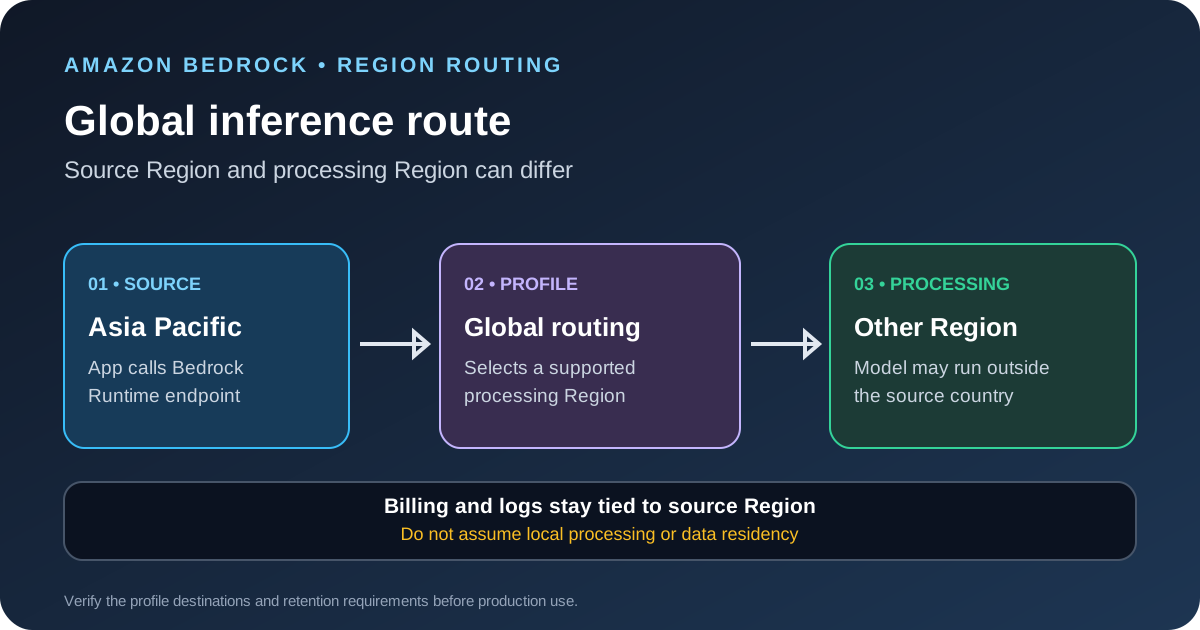
Teams in Singapore, Jakarta, Malaysia, Thailand and Taiwan can call OpenAI GPT-6 Sol and GPT-6 Luna through Amazon Bedrock global cross-Region inference from supported AWS source Regions. GPT-6 Astra is available through the same global profile from Singapore. This route can help when a single Region lacks capacity, but it does not guarantee that inference stays in the source country or Region.
The profile IDs are global.openai.gpt-6-sol, global.openai.gpt-6-luna and global.openai.gpt-6-astra. AWS published its implementation walkthrough on October 12, 2026. Before production use, confirm availability, configure permissions, test quota behavior and review the data-processing boundary.
Check the source Region and profile
AWS lists these source Regions for GPT-6 Sol and Luna: Singapore (ap-southeast-1), Jakarta (ap-southeast-3), Malaysia (ap-southeast-5), Thailand (ap-southeast-7) and Taipei (ap-east-2). GPT-6 Astra is available through global cross-Region inference from Singapore in the walkthrough. These are source Regions, not a list of destinations that may process a request.
First, enable the intended source Region in your AWS account if it is opt-in. Next, open the Bedrock inference-profile list from that Region and confirm that the exact profile is active. Inspect the profile details to see the model resources and destination Regions returned by AWS. Do not rely on a remembered region list; availability can change.
Configure the request
The Bedrock Runtime endpoint supports the Converse API and OpenAI-compatible Responses and Chat Completions APIs for the profiles covered by the AWS walkthrough. With Converse, pass the global profile ID as the model identifier. For the OpenAI-compatible endpoints, use the same profile ID in the model field and follow the Bedrock-specific authentication and request format.
- Select the source Region. Use a supported source Region and verify that the profile is active for your account.
- Choose the profile. Use
global.openai.gpt-6-solorglobal.openai.gpt-6-lunafor the five listed source Regions. Useglobal.openai.gpt-6-astraonly from Singapore as described in the announcement. - Configure the client. Use the Bedrock Runtime endpoint in the source Region and the API supported by your application. Keep the model profile ID in environment-specific configuration rather than copying it into several code paths.
- Send a low-risk test request. Start with a short, non-sensitive prompt. Confirm that the response format, token limit and error handling match your application's expectations.
- Test production-like traffic. Measure latency, output length, concurrency, throttling and cost before directing real users to the profile.
AWS documents different reasoning-effort ranges for Sol, Luna and Astra. Check the current model card before selecting an effort level or moving an existing OpenAI API integration. Do not assume every OpenAI API option or tool type works unchanged on Bedrock.
Set permissions before production
The calling identity needs permission to invoke the selected inference profile and the associated model resources. AWS's example policy includes the profile, the default project in the source Region and model resources used by the global route. Scope the policy to the intended profile and follow the documented resource format rather than granting access to every model.
Streaming requests may need an additional permission beyond a standard response. Check the current AWS policy example for the API and authentication method you use. A policy that works for one endpoint or API may not cover another endpoint or streaming path.
Organization-level policies can also block a request. A global cross-Region call may not match a strict source-Region allowlist, even when the source Region is approved. Do not respond by opening every Region for every service. Follow AWS guidance and scope any exception to the inference profile you intend to allow.
Understand where processing happens
Global cross-Region inference lets Amazon Bedrock select a supported commercial AWS Region where the model is deployed to process the request. The source Region is where your application calls the service. Billing, quota tracking, CloudTrail and CloudWatch remain tied to the source Region, but that does not mean the prompt and output are processed only there.
AWS says classifier-flagged traffic used for automated offline abuse detection can be retained for up to 30 days in the destination Region. Eligible customers may request full zero data retention through their AWS account team. If your contract, regulator or customer requires data to stay in a particular country or geography, treat global inference as a design decision that needs review, not as a local-processing option.
For a residency requirement, use an inference option whose documented destination boundary matches the requirement. Do not infer residency from the Region in your client configuration or from where CloudTrail stores the request record.
Budget quota and monitor the source Region
AWS documents Bedrock Runtime quotas for these GPT-6 profiles in tokens per minute. Input and cache-write tokens count one-for-one, while each output token consumes ten quota tokens. A request with 2,000 input tokens and 1,000 output tokens therefore uses 12,000 tokens of quota under that rule. This is a quota calculation, not a price estimate.
Track invocation counts, input and output tokens, latency, throttling, error rates and source Region in CloudWatch and CloudTrail. Test long prompts and peak concurrency, because average capacity can look healthy while a burst still hits a limit. Keep a fallback path and clear error handling for throttled requests.
For cost planning, see our guide to calculating LLM API cost per task. For response-time checks, the LLM API latency guide explains how to separate queueing from model generation. If you are building an agent on Bedrock, our Postman Agent Mode case study covers tool selection and context design.
Common failures to check first
- Access denied: Check the profile, project permission, source Region and organization-policy conditions.
- Profile rejected: Confirm that the exact profile ID is active from the source Region. Do not substitute a foundation-model ID when the endpoint expects an inference profile.
- Unexpected throttling: Review the source Region quota, token usage and concurrency. A global profile does not remove account quotas.
- Residency review fails: Re-check destination Regions and retention requirements. A source Region setting is not proof that inference stays there.
- Client migration breaks: Verify the API path, model parameter, authentication method and supported tool types in current AWS documentation.
Before you deploy
Test with a non-sensitive prompt, confirm the destination and access policy, measure the real workload and document the data boundary. Keep the profile ID, source Region, model, reasoning effort and application version in your deployment configuration so changes can be reviewed. If the application cannot accept cross-Region processing, do not enable the global route until the architecture and compliance requirements have been resolved.
Sources
- AWS Machine Learning Blog: Accessing OpenAI GPT models on Amazon Bedrock with global cross-Region inference.
- Amazon Bedrock documentation: Cross-Region inference.
- Amazon Bedrock documentation: Supported Regions and models for inference profiles.