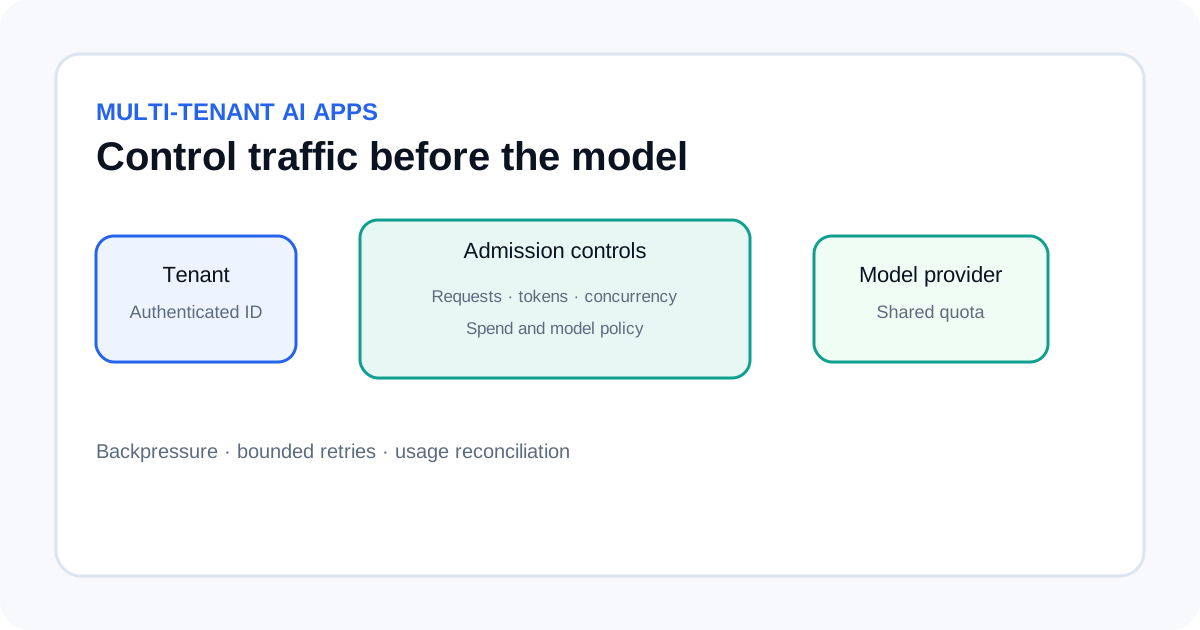
A multi-tenant AI application needs more than a provider-wide request limit. One customer can send a burst of short prompts, another can submit long contexts, and a third can keep many agent tasks running at once. A safe design controls requests, estimated tokens, concurrency and spend at tenant level, then applies a separate limit for the whole provider account so one tenant cannot consume all shared capacity.
Separate the limits you want to enforce
Request limits, token limits, concurrency limits and spend controls solve different problems. Requests per minute (RPM) cap how often a tenant can call the service. Tokens per minute (TPM) cap the amount of model input and output. A concurrency limit caps how many calls or agent jobs can be active. A spend budget limits the cost a tenant can generate over a longer period.
Provider limits are not always per end user. OpenAI documents rate limits at organization and project level, with model-specific request and token limits. Amazon Bedrock uses model- and Region-specific quotas. Your application needs its own tenant-level admission control even when the provider has account-wide limits.
Estimate tokens before admitting a request
Before sending a request, estimate input tokens and add the output-token allowance the application will permit. Use the tokenizer or a provider-supported estimate where available. A simple character count can be a rough guardrail, but it is not a reliable token count for every language, model or input type.
Do not reserve an enormous output allowance when the task normally needs a short response. Some providers calculate token-rate usage using the requested maximum output rather than only the tokens returned. OpenAI recommends matching the output-token limit to the expected completion size. Keep separate maximums for input size, output size and total context so one request cannot consume the whole tenant budget.
Use layered admission control
- Identify the tenant. Derive the tenant ID from the authenticated session or server-side account record. Do not trust an ID supplied only in the request body.
- Apply request limits. Check a per-tenant request bucket and the provider/model request bucket.
- Reserve token capacity. Estimate input plus allowed output tokens and check the tenant budget and provider capacity.
- Check concurrency. Refuse or queue the request if the tenant or provider has too many active jobs.
- Check spend policy. Verify that the tenant has not reached its configured budget and that the requested model is allowed.
- Record the decision. Store the tenant, model, estimated usage, admission result and request ID without logging secrets or unnecessary prompt content.
A token bucket is useful when you want controlled bursts. Keep counters in a shared store if requests can reach multiple application servers; an in-memory counter on each server can multiply the allowed rate. Use atomic updates and define what happens if the limiter store is unavailable.
| Control | Scope | Purpose |
|---|---|---|
| RPM bucket | Tenant and provider/model | Limits short request bursts. |
| Token bucket | Tenant and provider/model | Protects throughput and long-context capacity. |
| Concurrency semaphore | Tenant and provider/model | Prevents too many active calls or agent runs. |
| Spend budget | Tenant or billing period | Stops runaway cost across many requests. |
Keep tenant policies configurable
Store limits in a server-side policy record rather than scattering numbers across request handlers. A tenant policy can define allowed models, requests per interval, estimated tokens per interval, maximum concurrent calls, maximum output tokens and a spend threshold. Keep the provider-wide limit separate so the application protects shared capacity even if one tenant has a generous plan.
Do not copy a provider's current limits into a permanent code constant. Limits can differ by model, endpoint, account tier and Region, and providers can change them. Read the actual quotas for the account and leave a safety margin for estimation errors, retries and other applications using the same credentials.
Handle 429 responses without retry storms
A provider's HTTP 429 response can mean a temporary rate limit, an exhausted balance or a usage/spend limit. Read the error code and response headers before retrying. If a valid Retry-After header is present for a temporary limit, wait at least that long. Otherwise use exponential backoff with jitter and a strict retry count.
Do not retry every failure as if it were temporary. A billing limit will not be fixed by waiting a few milliseconds, and repeated failed requests may still count against rate limits. Avoid stacking retries in the SDK, application gateway and job worker. Choose one layer to own the retry policy and return a clear status when a request should not be retried.
For queued work, apply backpressure: slow intake when the provider bucket is nearly empty and resume gradually when capacity returns. For interactive requests, fail quickly with a useful retry hint instead of holding a web request open indefinitely.
Reconcile estimates with actual usage
Token estimates are admission-control inputs, not final billing records. After a response, record provider-reported usage and reconcile it against the reservation. Release unused reserved capacity, but keep accounting consistent if a request times out after the provider has processed it. Store the request ID and the minimum usage details needed for support and billing reconciliation.
Track rejected requests, provider throttles, output-token overruns, concurrency saturation and spend-limit denials separately. A single “429 count” hides whether a tenant exceeded policy, the provider account hit a quota, or a billing control stopped the request. Alert before shared capacity is exhausted and review tenant outliers before raising limits.
Test isolation and failure cases
- Send a burst from one tenant and confirm another tenant still receives capacity.
- Send long-context requests and verify token limits work even when RPM is low.
- Reach the concurrency limit and confirm queued work remains bounded.
- Simulate provider 429 responses with and without
Retry-After. - Test a spend cap separately from a temporary rate limit; retries must not bypass a hard budget.
- Restart a worker and confirm shared counters do not reset unexpectedly.
- Verify tenant identifiers, API keys and sensitive prompts do not appear in logs.
For retry behavior, see our AI API retries and fallbacks guide. The cost-per-task workflow helps estimate business cost, while the latency guide helps separate provider delay from queueing and application overhead.