Streaming lets a web application show an AI response as it arrives instead of waiting for the entire answer. That can make a long operation feel faster, but it adds work: the client must process partial events, the server must handle disconnects, and the interface must distinguish a finished response from a failed or interrupted one.
Choose the transport that fits the request
Server-sent events (SSE) are a simple text format for delivering one-way updates from a server to a client. OpenAI’s streaming guide uses SSE for HTTP streaming and documents typed events such as response.output_text.delta, response.completed and error.
For a browser application that sends a prompt in a POST request, fetch() with a readable response body is often easier than the browser’s EventSource API, which is designed around a persistent GET connection. Your server can accept the prompt through an authenticated POST, call the model provider from the server, then stream a controlled event format back to the browser. Keep provider credentials on the server; never place them in browser JavaScript.
Use WebSockets when you need ongoing two-way communication, such as sending incremental user input while receiving model events. For a request that sends one prompt and receives a stream, HTTP streaming is often simpler.
Keep the provider connection on the server
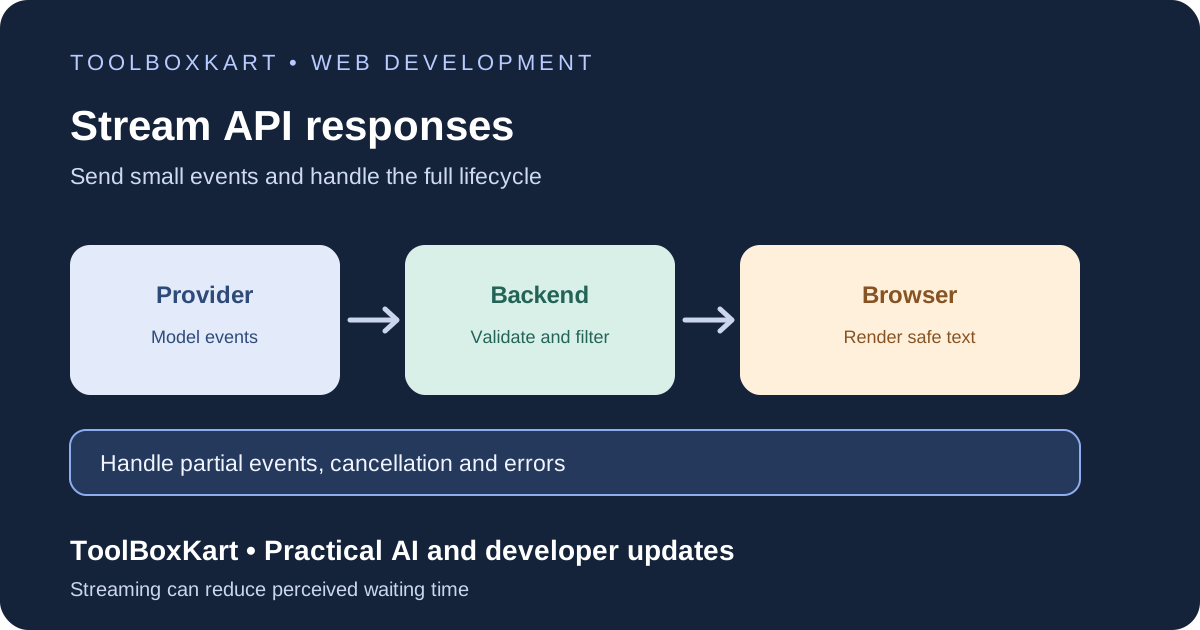
A safe architecture has three parts: the browser submits the task, your backend validates it and opens the provider stream, and the browser renders only the events your backend permits. The backend should enforce authentication, request-size limits, rate limits, model access and an overall deadline. It should translate provider-specific events into a small event contract your frontend can understand.
For example, your application might send only two event types to the browser: delta for text chunks and done when the response is complete. A separate error event can carry a safe user-facing message and a request ID. Avoid forwarding provider headers, internal traces, tool arguments or secrets to the client.
Read the stream as chunks, not complete messages
A network chunk is not guaranteed to contain one full event. It may end in the middle of a UTF-8 character, JSON string or SSE event. Keep a buffer and parse only complete event boundaries. If your backend sends SSE, messages are separated by a blank line and can contain more than one data line. If you forward the provider’s native stream, follow that provider’s documented event types rather than assuming every event is plain text.
Build the client so it can handle a chunk that contains half an event, several events at once, malformed data and a final buffered event when the stream closes. Use the streaming decoder mode when reading UTF-8 bytes so a multi-byte character split across network chunks is not corrupted. A simple split on every incoming chunk is not enough.
Make the server flush data and stop work on disconnect
The server must send headers that identify an event stream or streamed response and avoid buffering the entire body. With SSE, that usually includes Content-Type: text/event-stream, a no-cache policy and event messages separated by a blank line. Reverse proxies, compression layers and hosting platforms can still buffer responses, so test the actual deployed route rather than assuming the headers are enough.
When the browser closes the page or cancels the request, abort the upstream provider request if your SDK and runtime support it. Otherwise the model may keep generating and using tokens after the user has left. Also set a server-side deadline so an abandoned or stalled request cannot run forever.
If you use EventSource, remember that browsers may reconnect automatically after a connection closes. That is useful for resumable updates only if your server supports event IDs and replay. For a one-off generation, accidental reconnection can trigger confusing behavior if the endpoint starts a new generation each time. Define whether a stream is resumable or single-use.
Separate partial text from a completed answer
Do not treat the last text chunk as proof that the model finished successfully. The provider may send a completion event, an error, a refusal or an interruption. Keep explicit states such as connecting, streaming, complete, failed and cancelled. Enable actions such as copy, save or publish only when the response reaches the appropriate state.
Render streamed content as text unless you have a safe rendering pipeline. Do not pass each chunk straight to innerHTML; partial markup can be malformed, and untrusted output can create a cross-site scripting risk. Use textContent or text nodes for ordinary output. If Markdown is required, parse the completed content with a trusted sanitizer or render safe incremental blocks.
Moderation and tool calls need a separate plan
Streaming makes it harder to evaluate the full output before showing any of it. OpenAI’s documentation calls out this moderation risk: partial output may be harder to assess than a complete response. If your product requires moderation before display, buffer the content until it passes the required checks, or use an approved chunk-level process. Do not assume token-by-token display and full-response moderation are automatically compatible.
Tool calls also need clear event handling. Do not expose raw tool arguments to the browser and then act on them because the stream mentioned a tool. The backend should validate the requested tool, check access and require approval for high-impact actions. Keep the stream UI separate from the trusted execution path.
Test the failure paths
- The provider rejects the request before the first event.
- The connection fails after several text chunks.
- The user cancels while the model is still generating.
- A chunk ends in the middle of an event or UTF-8 character.
- The provider sends an error or refusal event.
- The reverse proxy buffers the output and defeats streaming.
- The output contains markup that should not execute in the browser.
Track time to first visible token, total completion time, stream duration, bytes sent, disconnect rate and failed generations. For broader reliability and cost controls, see our AI API retries and fallbacks guide and LLM API cost-per-task guide.
Frequently asked questions
Does streaming reduce total model generation time?
Not necessarily. It lets the application show early output before generation finishes, which can reduce perceived waiting time.
Can I put the model API key in browser JavaScript?
No. Keep provider credentials on the server and let the browser call your authenticated application endpoint.
Should I use SSE or WebSockets?
SSE fits one-way server-to-client updates. WebSockets are more useful when both sides need to exchange messages continuously during the same session.